The EK9 IDE
The EK9 IDE is a desktop editor for EK9 with the compiler built in. You start it with ek9 -ide.
ek9 -ide
What you need
ek9 -ide starts the IDE. Like the rest of EK9, it needs Java 25 or later.
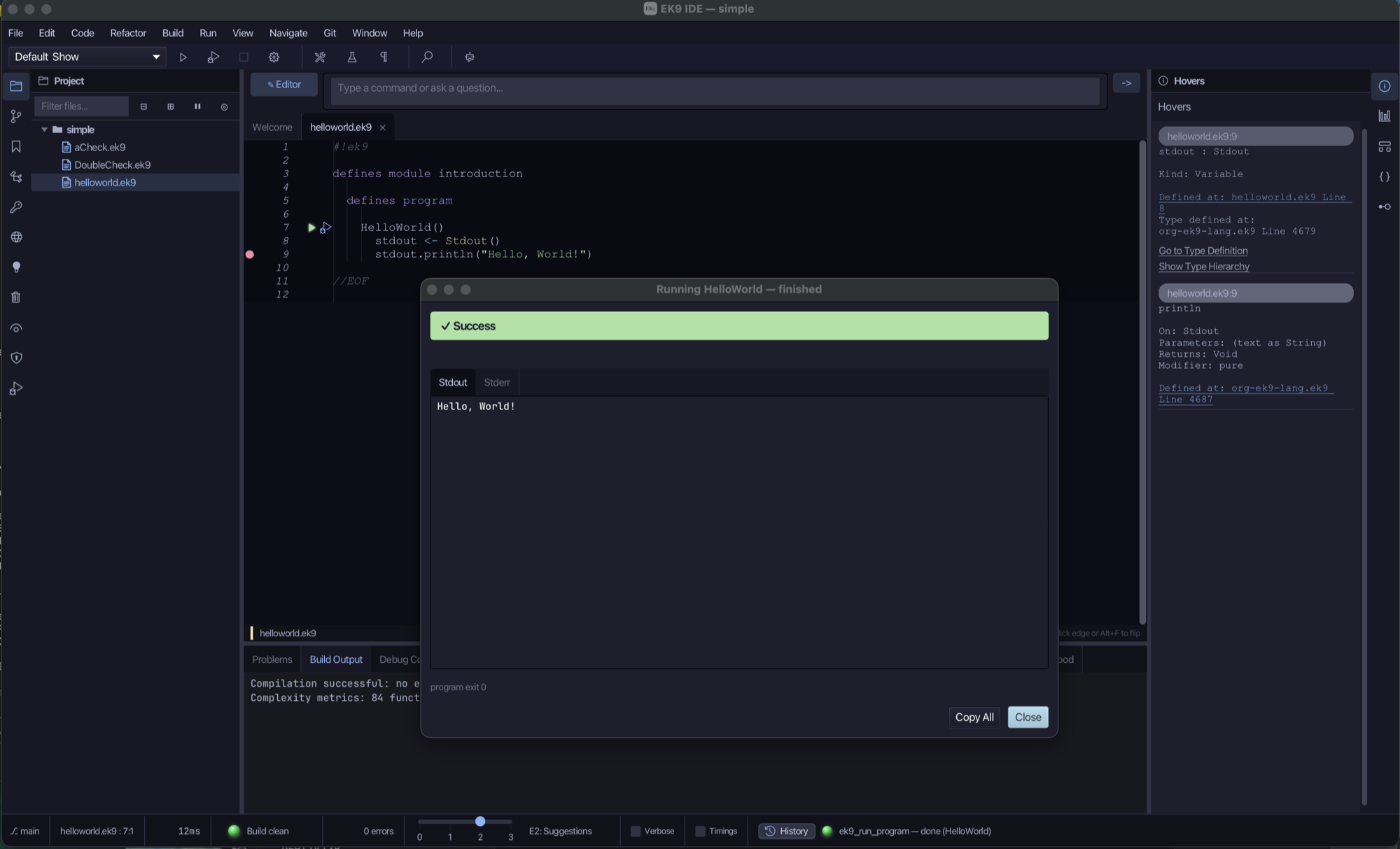
A first program
Your first project makes a new project and runs a program in it, step by step, with a picture of
each step. To open a directory of .ek9 files you already have, use File > Open Project…, open a source file, and
run its program with Run > Run Program…. Here is the program from the introduction:
#!ek9
defines module site.introduction.hello
  defines program

    HelloWorld()
      stdout <- Stdout()
      stdout.println("Hello, World")
Download introduction_hello.ek9
The editor indents with two spaces: Tab inserts two spaces and Shift+Tab outdents.
The lessons
The IDE teaches itself in lessons: each one shows you an action step by step, then watches while you do it. Each
lesson has a page of its own here, with every step and a picture of the IDE once it is done. To play one in the IDE,
choose Help > Lessons and its group, or run ek9 -ide -lesson <name>.
Getting started
Your first project, and finding your way round the IDE.
- Your first project: A new project, a new file, the example program pasted in from the answers, and run.
Finding
Search and replace, in Text or Symbols mode, across one file, a module or the whole project - and the two other ways of finding your way, Find Construct and Find References.
- Find: text: Type into the find bar and watch the count update live, step through matches with Find Next/Previous, then narrow with Match case (Aa) and Whole word (W) - Text mode searches the file itself, comments and Strings included.
- Find: regex replace: The replace row, a regular expression with a capture group reordered in the replacement, and Replace All - in Text mode, so the file is saved once the change is made.
- Find: symbols: Symbols mode asks the last compile, never the text - a name in a comment or a String never matches - classified by the three kind chips (Constructs, Members, Variables), each with its own dropdown, and narrowed by whether a place is declared, read or written.
- Replace: symbols: Replace in Symbols mode renames the whole symbol through ek9_rename_symbol - a compile-checked preview, one atomic change across every place it is used - never a raw text edit.
- Find in Project: The File / Module / Project scope, Edit > Find in Project…, the List button bringing the Find Results tab forward again, and jumping from a result straight into its file.
- Find your way: Find Construct… jumps to a class, function or program by name, anywhere in the project; Find References jumps the other way, from a symbol to every place it is used.
Writing code
New constructs - classes, functions, records - and the fields, methods and operators they hold; the examples of Getting Started with EK9.
- Chapter 16: a class, built: Build the book's Counter class and its program with the IDE's own tools - New Construct, Add Field, Add Method - typing only the logic no tool can write.
- Chapter 4: a function, built: Build the book's announce function and its program with New Construct - typing only the logic no tool can write, and the short line explaining why the function returns nothing.
- Chapter 14: an enumeration, built: Build the book's Day enumeration, in one call, and the function and program that use it with the IDE's own tools - New Construct ▸ Type ▸ Enumeration…, ▸ Function…, ▸ Program… - typing only the logic no tool can write.
- Chapter 14: a record, built: Build the book's Coord record - a point built complete in one step, or blank and filled in afterwards - and the moveTo function and program that use it, with the IDE's own tools: New Construct ▸ Record… with its Fields table, Add Constructor ▸ (From All Fields, then No-Arg default), Add Operator ▸, ▸ Function…, ▸ Program… - typing only the logic no tool can write.
- Create Dynamic Function: Author a closure - a local variable holding a small function, extending a base you pick - after the caret, with no construct of its own to name.
- Create Dynamic Class: Author an inline class - implementing one or more traits, extending a generic base, or naming a module-level tuple type - after the caret, with no construct of its own to name.
- Chapter 3: a loop, reshaped: Build the book's Countdown program with New Construct, type its plain straight-line version first, then use Surround With to fold the repeating part under a while head and replace its placeholder with the real test.
- Chapter 17: an abstract type and its subtypes, built: Build the book's Shape hierarchy with the IDE's own tools - a constant, Shape as abstract with two abstract methods, Circle and Rectangle each extending it with a field, a constructor and overriding methods, and the program that holds both in one List of Shape - typing only the logic no tool can write.
- Chapter 18: traits and delegation, built: Build the book's View trait, Home and Framed classes with the IDE's own tools - New Construct, Add Method, Adopt Trait (both ways), Add Field, Add Constructor, Add Operator - typing only the logic no tool can write.
- Chapter 21: operators, built: Build the book's Vec2 record with its own + and $, then default <=> and ? for the rest - New Construct ▸ Record… with its Fields table, Add Constructor ▸, and Add Operator ▸ Custom Operator… (an arbitrary operator - the fixed defaultable leaves cannot reach '+') beside the fixed defaultable leaves - typing only the logic no tool can write.
- Chapter 21: promotion, #^: Build the book's Celsius record - its own $, and a #^ that promotes it to a Fahrenheit Float - with New Construct ▸ Record…, Add Constructor ▸ and Add Operator ▸ (its $ leaf and Custom Operator… for #^), then a program that promotes a Celsius and an Integer to a Float, and run it - typing only the logic no tool can write.
- Chapter 19: a component, built: Build the book's Pricing component - a class and a function hidden behind an abstract interface, and the concrete StandardPricing and program that use it - with the IDE's own tools, typing only the logic no tool can write.
- Chapter 5: tests, built: Build the book's square/cube functions and the @Test programs that check them with the IDE's own tools - New Construct ▸ Function… and ▸ Test…, typing only the logic no tool can write - then Run Tests, read the Tests tab and its coverage shading, and try Generate Edge-Case Tests.
- Chapter 2: values, reshaped: Build the book's Values program with New Construct, type a plainer draft first - a stray local that only gets in the way, two expressions written straight into their println calls - then use Inline Variable to remove the stray local and Extract Variable, twice, to give each expression the name the book prints it by.
- Chapter 12: a pipeline, built: Build the book's isEven/doubleIt functions and the Numbers program's stream pipeline with the IDE's own tools - New Construct ▸ Function… and ▸ Program…, typing only the logic no tool can write - then read it, stage by stage, with Analyse ▸ Pipeline before it runs.
- Chapter 10: guards, reshaped: Build the book's Guards program with New Construct, type a plainer, declare-then-check draft first for each guard - a value declared, then checked with a separate '?' right after it - then use Lift into Guard to fold the two into one guarded head: a plain if, an if with an extra condition kept as 'then', and the same fold before a while and a for.
- Chapter 11: Optional and Result, built: Build the book's safeDivide function and Div program with the IDE's own tools - New Construct, then Surround With to fold the division itself under an if ... else head before the real branches are typed in - then read Result of (Integer, String)'s own surface with Analyse ▸ Effective API before the program runs.
- Chapter 15: a constrained type, built: Build the book's DrivingAge constrained type, in one call, and the function and program that use it with the IDE's own tools - New Construct ▸ Type ▸ Constrained…, ▸ Function…, ▸ Program… - typing only the logic no tool can write.
- Chapter 7: asking about a type: Build the book's Measures program with the IDE's own tools - New Construct ▸ Program… - then ask the IDE what a Dimension is two ways before it runs: /h Dimension in the input bar, and Analyse ▸ Effective API with the caret on width.
- Chapter 8: a text type, built: Build the book's Party text type and Show program with the IDE's own tools - New Construct ▸ Program…, then Extract to Localized Text… on a hard-coded greeting, which creates Party in one call (its own new-type fields) and renames the inferred parameter (its own Parameters table), then Add Locale… (twice) - typing only the wording no tool can write: English first, the parameter's real name, then French and German.
- Chapter 9: collections, asked about: Build the book's Basket program with the IDE's own tools - New Construct ▸ Program… - then ask the IDE about collections two ways before it runs: /q 129 in the input bar, over the Dict's own getOrDefault, and Analyse ▸ Effective API, read once on a List and once on a Dict.
- Chapter 20: a generic type, read: Build the book's Show program - a List of String and a List of Integer, the one List filled two ways, then a Dict literal - with the IDE's own tools, then read List of String's own place in the type system with Analyse ▸ Type Hierarchy, and List of Integer's methods and operators with Analyse ▸ Effective API, before it runs.
- Chapter 22: a program with arguments, built: Build the book's NoteLink program with the IDE's own tools - New Construct ▸ Program… with its CLI parameters table - typing only the logic no tool can write - then run it with an argument typed into Run Program…'s own Arguments field, and again from a saved run configuration whose own Environment field, opened with Run ▸ Configurations…, sets the web address Run Program… has nowhere to.
- Chapter 23: the game, built and played: Build the book's whole game - the Score record, the Game class, six small functions and the Guess program itself - with the IDE's own tools: New Construct ▸ Record…/Class…/Function…/Program…, Add Field…, Add Constructor ▸, Add Method…, Add Operator ▸ - typing only the logic no tool can write - then play it for real: Run ▸ Debug launches it live, and the Debug Console's own Standard Input row sends it a few guesses to a win, the way a person at a keyboard would (Run Program… alone never feeds a program's stdin).
- Chapter 23: running the tests, and the Journal: Run the fifteen tests that cover the game's record, class and functions, read the Tests tab and its coverage, then record one run of the WinningGame test and watch Game.tries change, tick by tick, in the Journal.
Refactoring
Rename, extract, inline, change a signature, move: each previewed before it is applied.
- Extract Constant: Give a literal a name: a constant defined once, and every use of the literal in the file replaced by it.
- Rename Symbol: Rename a name and every use of it, wherever it is - for a name that says nothing of what it holds.
- Extract Variable: Give part of an expression a name: a local that holds it, and the expression using the name.
- Change Signature: Add, remove or reorder a function's parameters, and every call to it changes with them.
- Extract Method: Move a block of statements into a function of its own, called where the block was - nesting comes down.
- Safe Delete: Remove a class, function, method or field once nothing uses it - here an override that repeats its super.
- Unused Code: Scan the workspace for every callable nothing reaches - grouped dead ahead of test-only ahead of untested public API - then remove one straight from the window with Delete safely…, the SAME compile-checked preview Safe Delete opens from a declaration.
- Organize Constants: Gather every constant of a module into one file - here three files' constants into a file of their own.
- Organize References: Delete the unused entries of a file's references block - usage judged by a scratch compile, so a name collision never fools it.
- Sync References: Add the missing entries AND delete the unused ones of a file's references block, in one pass - the EK9 'Organize Imports'.
- Inline Variable: Put a local's value where it is used and remove the local - for a name that says no more than its value.
- Introduce Parameter: Turn a value a function uses into one its callers pass, the old value passed at every call.
- Inline Function: Put a function's body in place of every call to it and remove it - for a function that adds nothing.
- Move Construct: Move a construct to another file - and module - with every reference to it following.
- Lift into Guard: Turn a declare-then-check pattern into one guarded head - a control construct that enters only when its variable is set, the separate check gone.
- Wrap with coalescing: Wrap a selected expression in one of EK9's null-safe operators: ?: defaults an unset value, <? and >? return the lesser or greater of two operands.
- Make Open: Add 'as open' to a closed class, record, component or function, so it can be extended.
- Fix Purity Contract: Add or remove 'as pure' on the callable a purity error names, from the Blast Radius pane - here an override missing the purity its parent promises.
- Implement Methods: Insert an override stub for every abstract trait method a class has not yet implemented.
- Rewrite String Concatenation: Rewrite a
+string concatenation of three or more parts into the equivalent backtick interpolation. - Pull Up: Promote a method or operator from a subclass into its superclass, where every subclass can use it.
- Push Down: Relocate a method or operator from a superclass into the subclasses you choose - removed from the superclass, copied into each one picked.
- Extract Trait: Pull a class's public methods out into a new trait it then implements - the class keeps its bodies and gains 'with trait of' and 'override'.
- Adopt Trait: Add 'with trait of' and a trait's name to a class or component - an override stub for every abstract method, or forward them all to an existing field instead.
- Make Abstract: Add 'as abstract' to a class, record, component or function directly - instead of implementing every member it owes.
- Make Closed: Remove 'as open' from a class, record, component or function, returning it to EK9's closed-by-default.
- Make Concrete: Remove 'as abstract' from a construct whose abstract members are all implemented, so it can be instantiated directly.
- Seal Type: Add an 'allow only A, B, C' clause to a class or trait, restricting extension to exactly the subtypes listed.
- Unseal Type / Add to Allowlist: Widen an already-sealed type's 'allow only' list by one entry from the error site itself, or remove the clause entirely - two ways to clear the same E05240, from two different distances.
- Introduce Field: Lift a local and its initialiser up to a field of the enclosing class, record or component, keeping the same name - state the whole construct shares, not just the one method that declared it.
- Rename Field: Rename a field and every reference to it inside its owning construct - bounded to the one construct, because EK9 fields are private to their declaring construct.
- Remove Field: Delete a field from a class, record or component once every reference inside that construct's body is classified and, where mechanical, repaired.
- Change Visibility: Narrow or widen a method's access modifier - the submenu only offers the moves that are legal for the method under the caret.
- Surround With: Fold a selection of whole statements under an if, try/catch, for-range or while head - the tool re-indents them, since EK9's brace-free layout is never mis-typed by hand.
- Generate Delegation: Wire a trait the class already declares to an existing field with 'by' and the field's name, so the compiler forwards every trait method to it - no stub bodies to fill in.
- Generate Dispatcher: Scaffold a dispatcher entry and one handler overload per subtype of a base type - sealed for exhaustive dispatch, or open with the entry's fallback covering the rest.
- Extract to Localized Text: Move a hard-coded string out of the code and into a localized text method, rewriting the call site to use the text variable already in scope.
- Organize Localized Text: Gather a module's localized text into one of three layouts: one file per locale, one file per text type, or everything collapsed into a file you name.
- Inline Candidates: Find locals whose name adds little over their initialiser, bucketed worth-inlining ahead of mechanically-safe - then inline one straight from the window.
- Promote to Constant: Move a
name <- literaldeclaration - a property or a local - into the module's defines constant block, keeping the same name. - Convert Constructor: Swap a no-arg constructor between its two equivalent forms: 'default Name()' and an explicit body that sets every field with :=? - ready to customise, or collapsed back once it is not.
- Expand Default Operator: Replace a 'default operator' line (default operator $, == and the like) with the explicit body the compiler would synthesise from the fields - ready to customise, or collapsed back once it is not.
- Rename File / Move File: Relocate a .ek9 file on disk, contents untouched - Rename edits the basename in place, Move edits the whole path into another directory - because EK9 module identity comes from the file's own 'defines module' line, never its name or location.
- Toggle Comment, Remove Comment, Reformat: Four code-tidying actions with no dialog and no preview: Toggle Comment wraps whole lines in EK9's <!- -!> block form without deleting them, Remove Comment deletes a comment outright, and Reformat File / Reformat All Open Files re-render a file - or every open file - in canonical EK9 style.
- New EK9 File, New Directory, Delete File, Delete Directory: The Project panel's own right-click menu: make a new .ek9 file (the three-part boilerplate also written by ek9_write_file) or a new directory, and delete a file or an empty directory - each commits straight to disk, no preview.
Debugging and the Journal
Breakpoints and stepping, and the Journal: a run recorded and read backwards to its cause.
- The Journal: one run: Record every change to one value while a program runs, then read the failure backwards to its cause.
- The Journal: comparing runs: Record several runs, choose a passing one and the failing one, and see what only the failing run did; then write it up as a Journal Report.
- The Journal: a new investigation: Run an investigation, then run it again with one input changed - the Journal's own way to try a variation - and see what that changes.
Understanding a codebase
The Analyse views: what calls what, what depends on what.
- Show Blast Radius: See who a purity change would reach before you make it - the callers that break if pure is removed, the callees that must become pure if it is added - from the right-click Show Blast Radius item, at the point of pain.
Security, packages and Git
Sanitised input, packages and their versions, and Git.
- Capabilities: The security-capability audit window: every gated system type the code uses against what the package declares - under-declared (the E12010 set) fixed with Add Capability, over-declared (declared but unused) tidied with Remove Capability.
Fixing errors
Every error EK9 reports is explained - in the Help tab, or by ek9 -h and its code - and the explanation ends with "Show me how to fix it": a lesson that opens the error's example and fixes it, step by step. They are listed in the error index.
The menus
Each menu holds one kind of action. Right-click in the editor for everything that applies where the caret is, or use Refactor > Refactor This… (Ctrl+T) for the same menu from the keyboard.
| Menu | What it holds |
|---|---|
| File | New Project…, Open Project…, Recent Projects, Save, Save All, Settings… |
| Edit | Undo, Redo |
| Code | Code you write or have written for you: New Construct, New Package…, dynamic functions and classes, Localisation, Generate (Implement Methods…, Delegation…, Dispatcher…, Edge-Case Tests), Reformat, Toggle Comment, Organize References |
| Refactor | Code reshaped without changing what it does: Refactor This…, Rename Symbol…, Change Signature…, Safe Delete…, Extract Method…, Extract Variable…, Introduce Parameter…, Inline Variable, Inline Function…, Move Construct…, Organize Constants… |
| Build | Compile Project, dependencies, packaging, signing keys, Versioning |
| Run | What runs: Run Tests, Quality Report, Journal Report, New Journal Investigation…, Run Program…, Configurations… |
| Analyse | Views that explain the code: one construct (Construct, Scope, Effective API, Flow Analysis, Pipeline), how constructs and modules relate (Module Landscape, Dependencies, Service Routes, DI Wiring, Neighbourhood, Type Hierarchy, Call Graph, Dispatcher, Blast Radius) and locks (Lock Catalogue, Deadlocks, Lock Fingerprint) |
| View | The IDE's layout: the AI Control Centre, Bottom Panes, Tool Windows, Toggles |
| Navigate | Go to Definition, Find Construct…, Go to Line…, Find References, Next Error, Previous Error |
| Git, Window, Help | Version control; detached windows; Getting Started, the paradigm, Documentation, Licences |
Using VS Code or IntelliJ instead
The EK9 extension for VS Code (vscode-ek9-ls) starts the EK9
language server, ek9 -ls. The server reports the compiler's errors as you type, and answers hover, completion,
go to definition and find references.
The EK9 plugin for IntelliJ (intellij-ek9-ls) uses the same
language server, and the EK9 debug adapter, ek9 -dap, for breakpoints. It needs the LSP4IJ plugin installed first.
The language
This section covers the IDE. The language itself is in the EK9 language reference, starting with Structure.