Compile-Time Code Quality Enforcement
Either Good Code or Errors, Never Warnings
The EK9 compiler checks code quality as well as types. It measures complexity, cohesion, coupling, inheritance depth, naming and more on every compile, and code that fails a check does not compile. Other languages leave this to optional tools (linters, static analysers, code quality platforms); in EK9 it is part of the compiler.
Why EK9 does it this way. If your code compiles, it has passed every enforced check on this page. There are no warnings to ignore, no thresholds to configure and no tools to integrate. A warning records something to fix "later"; an error means that kind of debt cannot build up. Design note: errors, not warnings sets out the argument.
Add -E3 to the command line for a detailed explanation of any quality error. See
Error Verbosity Levels for all the levels.
- AI coding assistants: the quality checks are designed with AI-assisted development in mind. The For AI Assistants page documents the JSON output schemas, the metric thresholds, refactoring patterns and workflow templates.
- Security: the Input Sanitization framework detects and blocks common web attacks (SQL injection, XSS, command injection) where input arrives. Security is part of the language, not added afterwards.
The Quality Pyramid
EK9 checks quality at five levels. Code must pass every level that is built (the top one is planned) to compile.
                    +-----------------------+
                    |   Duplicate Code      | <- Codebase-level
                    |   Detection (FUTURE)  |    (DRY principle)
                    +-----------------------+
                             ^
                             |
                    +-----------------------+
                    |   Inheritance Depth   | <- Hierarchy-level
                    |   Limits (E11019)     |    (composition > inheritance)
                    +-----------------------+
                             ^
                             |
                    +-----------------------+
                    |   Cohesion/Coupling   | <- Architecture-level
                    |   (E11014, E11015)    |    (SOLID principles)
                    +-----------------------+
                             ^
                             |
                    +-----------------------+
                    |   Complexity Limits   | <- Function-level
                    |   (E11010-E11013)     |    (cognitive load)
                    +-----------------------+
                             ^
                             |
                    +-----------------------+
                    |   Purity and Safety   | <- Expression-level
                    |   (pure keyword)      |    (correctness)
                    +-----------------------+
Layer 1: Purity and Safety (Expression-Level)
The foundation. A pure function or method cannot mutate anything or reassign an ordinary variable
(writing output through Stdout aside); it may assign its own returning variable, and give an unset
variable its first value with :=?. That makes it predictable and easy to test; the compiler
checks the keyword. With EK9's
tri-state semantics and guards, whole
categories of bug become compile errors, such as reading a variable that may never have been given a value.
Layer 2: Complexity Limits (Function-Level)
Functions, methods and operators have complexity limits based on cyclomatic complexity. They keep cognitive load manageable and push you to split code into smaller, focused parts. See E11010, E11011 and E11013.
Layer 3: Cohesion and Coupling (Architecture-Level)
A class must keep high cohesion (its methods work together on related data) and low coupling (few dependencies on other types): the measures behind the SOLID principles. See E11014 and E11015.
Layer 4: Inheritance Depth (Hierarchy-Level)
Deep hierarchies are hard to understand and maintain. EK9 limits inheritance depth and points you to
composition via delegation with the by keyword. See
E11019.
Layer 5: Duplicate Code Detection (Codebase-Level)
Planned: IR-based similarity detection will find duplicated code across your codebase and enforce the DRY (Don't Repeat Yourself) principle at compile time.
Why Compile-Time Enforcement?
Most languages leave quality to separate, optional tools: style checkers, quality platforms, security scanners, code review and CI gates. Each can be misconfigured, ignored or bypassed, so warnings accumulate. EK9 replaces them with one tool, the compiler:
- No configuration — the thresholds are part of the language
- No external tools — the checks run during compilation
- No warnings — code either compiles (passed) or does not (failed)
- No bypass — quality is mandatory, not optional
The "No Gray Area" Principle
Traditional Approach:
+-- Compiles                          (green)
+-- Compiles with warnings            (gray area - technical debt zone)
+-- Doesn't compile                   (red)

EK9 Approach:
+-- Compiles (passed ALL checks)      (green)
+-- Doesn't compile                   (red)

No gray area. No accumulating debt.
The design note covers the tools EK9 replaces and why each can be bypassed.
Implemented Quality Metrics
Each check below is a compile error, with guidance on how to fix it.
4.1 Complexity Limits
Coming from Java, Python or C++? If you are used to 100-line methods with nested if/else chains, note that EK9 measures McCabe cyclomatic complexity at compile time. The limits are 45 for one callable (function, method or operator) and 500 summed across a type, a nesting depth of 6, and statement budgets (NCSS) of 150 for a function, 100 for a method and 50 for an operator. The ceilings sit well above the level the research below calls risky, so ordinary code never meets them; they stop code running away. The table below has the exact values and error codes.
Why Complexity Limits Matter: The Evidence
- McCabe (1976): introduced cyclomatic complexity and proposed 10 as a practical upper bound for a module
- NIST Special Publication 500-235 (Watson & McCabe, 1996): "The original limit of 10 as proposed by McCabe has significant supporting evidence, but limits as high as 15 have been used successfully as well" - beyond that, the testing effort a module needs keeps growing
A High-Profile Case Involving High Complexity
- Toyota unintended acceleration (Bookout v. Toyota, 2013): the expert review of the engine control software found 67 functions with cyclomatic complexity over 50 - "untestable" by the usual measure - and a throttle-angle function at 146 (Barr's testimony; Koopman, "A Case Study of Toyota Unintended Acceleration and Software Safety", 2014)
EK9's Thresholds
Cyclomatic complexity (McCabe, 1976) counts the decision points in code. The higher it is, the harder the code is to understand, test and maintain.
| Error Code | Metric | Threshold | Description |
|---|---|---|---|
| E11010 | Cyclomatic Complexity | Callable: 45, Type: 500 | Too many decision points (if/switch/loops) |
| E11011 | Nesting Depth | Max: 6 levels | Absolute structural limit for nested control structures |
| E11012 | Statement Count (NCSS) | Function: 150, Method: 100, Operator: 50 | Too many statements: the code is doing too much |
| E11021 | Cognitive Complexity | Max: 35 points | Guards (<-) add +1 penalty, cost multiplied by depth |
| E11013 | Expression Complexity | Max: 15 points | Too much in one expression, such as nested coalescing operators (?:, <?) |
| E11022 | Class Should Be Component | ≥4 service fields, 0 data | Pure service coordinator should use defines component |
| E11023 | Missing 'by' Delegation | ≥70% override, ≥5 methods | Manual forwarding should use by delegation |
| E11024 | Hybrid Class-Component | 1+ by, ≥3 services |
Mixed responsibilities should be split |
| E11025 | Excessive Mixed Responsibilities | ≥3 services AND ≥3 data | Blob/God Class - split into component + data class |
What adds complexity: each if, switch case, while,
for loop, Boolean operator (and, or), exception handler and stream
pipeline stage.
Stream Pipeline Complexity
Each stream pipeline stage adds a weighted cost to the function or method that holds it. A stage that changes the element type costs more than one that keeps it, because the reader has to work out the type at every later stage.
| Cost | Operations | Rationale |
|---|---|---|
| +1 | filter, reject, sort, head,
tail, skip, uniq, call, async |
Type-preserving — same element type in and out |
| +2 | map, group, flatten,
split, join, tee |
Type-changing — element type changes or a side-channel is introduced |
The source (cat) adds +1 and the terminal (> stdout, collect as)
adds +1. So cat items | filter by pred > stdout adds 3, and
cat items | sort | group | flatten | map by fn > stdout adds 9 (1 + 1 + 2 + 2 + 2 + 1).
Practical guidance: a pipeline of 3–5 stages reads clearly. At 6–7 stages, consider whether intermediate variables or a focused helper function would read better.
Cognitive Complexity (E11021): based on SonarQube's Cognitive Complexity metric, adapted for EK9. The
formula is (base_cost + guard_penalty) × nesting_depth. A guard (<-) packs a
declaration and a check into one line, so it adds +1. Six nested guards score 42 and fail (42 > 35), while
six nested plain ifs score 21 and pass; both are within E11011's depth limit of 6. So E11021
catches code that is hard to follow even when its structure is within limits.
4.2 Cohesion Metrics (LCOM4)
Ever opened a class and found it does five unrelated things? That's low cohesion - methods that don't work together, operating on separate groups of fields. EK9 allows a class an LCOM4 of at most 8.
Why Cohesion Matters: The Evidence
- Chidamber & Kemerer (1994): defined LCOM, the lack-of-cohesion metric, as part of their object-oriented metrics suite
- Martin (2003): "A class should have one reason to change" - Single Responsibility Principle
EK9's Approach
Cohesion measures how well the methods of a class work together. EK9 uses LCOM4 (Lack of Cohesion of Methods, version 4) from Hitz & Montazeri (1995): the number of groups of methods that share no fields.
| Error Code | Construct | Threshold | What It Means |
|---|---|---|---|
| E11014 | Class | Max LCOM4: 8 | Class has too many unrelated method groups |
| E11014 | Component/Service | Max LCOM4: 10 | Component coordinates too many concerns |
If your class has methods that share no fields with each other, it is doing unrelated things: split it into focused classes.
Exemptions: traits, records and functions are not checked. A trait's methods are abstract (no field access), a record is about its data and operators, and a function has a single body.
4.3 Coupling Metrics (Efferent Coupling)
Ever changed one class and watched 15 others break? That's high coupling - so many dependencies that the code is fragile and hard to refactor. EK9 allows a class to depend on at most 12 other types (Ce).
Why Coupling Limits Matter: The Evidence
- Chidamber & Kemerer (1994): defined coupling between objects (CBO) as part of their object-oriented metrics suite
- Basili, Briand & Melo (IEEE TSE, 1996): across eight projects, coupling between objects was one of the metrics that predicted which classes were fault-prone
- Martin (2003): "Classes should depend on abstractions, not concretions" - Dependency Inversion Principle
EK9's Thresholds
Efferent coupling (Ce) is the count of other types a construct refers to. The more there are, the more ways a change elsewhere can break it.
| Error Code | Construct | Threshold | What It Means |
|---|---|---|---|
| E11015 | Class | Max Ce: 12 | Class depends on too many external types |
| E11015 | Component/Service | Max Ce: 15 | Entry point coordinates too many dependencies |
| E11015 | Trait/Record/Function | Max Ce: 8 | Simpler constructs should have fewer dependencies |
- Counted: field types, parameter types, return types, super classes, traits, and the variables a dynamic function or class captures.
- Not counted: built-in types from
org.ek9.lang(Integer, String, List and so on). They are part of the language, not external dependencies.
4.4 Module-Level Quality Metrics
EK9 also checks quality at the module level, across all the source files of a module, to catch architectural problems that span files.
Module Coupling (E11016)
The number of other modules a module depends on. A module that depends on too many is fragile and hard to maintain on its own.
| Error Code | Metric | Threshold | What It Means |
|---|---|---|---|
| E11016 | External Module Count | Max: 10 | Module depends on too many other modules |
- Counted: every reference to a construct defined in another module: field types, parameter types, return types, super classes and traits.
- Not counted: references to the built-in
org.ek9.langmodule, which is part of the language runtime.
Module Cohesion (E11017)
How well the constructs in a module relate to each other. Constructs that refer to each other (through field types, parameters, inheritance and so on) are connected; a disconnected group is a cluster with no references to the rest. Many disconnected groups (found with connected-component analysis, as LCOM4 does) suggest the module should be split.
| Error Code | Metric | Threshold | What It Means |
|---|---|---|---|
| E11017 | Disconnected Groups | Max: 30 groups AND >88% | Module has too many unrelated construct groups |
The error needs BOTH more than 30 disconnected groups AND more groups than 0.88 times the number of constructs, so a utility module of many independent constructs passes while a fragmented one does not. A module with fewer than 60 constructs is not checked: fragmentation only matters in a large module.
4.5 Inheritance Depth Limits
Ever traced through 7 levels of inheritance to understand a single method? Deep hierarchies create "yo-yo" navigation and the fragile base class problem. EK9 allows a class at most 4 levels.
Why Inheritance Depth Limits Matter: The Evidence
- Chidamber & Kemerer (1994): defined Depth of Inheritance Tree (DIT) as part of their object-oriented metrics suite
- Basili, Briand & Melo (IEEE TSE, 1996): classes deeper in the inheritance tree were more likely to be fault-prone
- Gamma et al. (1994): "Favor composition over inheritance" - Design Patterns fundamental principle
- Bloch (2008): Effective Java Item 16: "Composition over inheritance" prevents fragile base class problem
Real-World Example
In Java's Swing, JButton sits five classes below Object (Component,
Container, JComponent, AbstractButton), and a change to a base class
such as Component reaches every class beneath it. Later UI frameworks such as React and Flutter
favour composition.
EK9's Solution
To understand a class in a deep hierarchy you have to trace through every level above it. EK9 limits the
depth and offers delegation with the by keyword instead.
| Error Code | Construct | Max Depth | Rationale |
|---|---|---|---|
| E11019 | Class | 4 | Standard aggregate |
| E11019 | Trait | 4 | Interface composition chains |
| E11019 | Component/Service | 4 | Entry point specialization |
| E11019 | Function | 3 | Function inheritance is rare |
| E11019 | Record | 2 | Data-focused, minimal behavior |
The alternative: instead of deep inheritance, compose and delegate behaviour with by:
#!ek9
defines module site.quality.delegation

  defines trait
    Printable
      print() as abstract

  defines class
    ConsolePrinter with trait of Printable
      override print()
        Stdout().println("Console output")

    //Instead of: class MyClass extends DeepHierarchy
    //Use delegation:
    MyClass with trait of Printable by printer
      printer as Printable: ConsolePrinter()

      default operator ?

  defines program
    Delegate()
      MyClass().print()
Download quality_delegation.ek9
4.6 Combined Complexity and Size
A function can pass both the complexity limit (E11010) and the statement limit (E11012) while being high in both, which is a maintainability risk in itself. EK9 checks that combination too (E11020).
Research Basis: NASA Software Assurance Technology Center studies found that modules with both high complexity AND large size have the lowest reliability (Rosenberg, Hammer & Shaw, "Software Metrics and Reliability", ISSRE 1998). Individual limits miss this critical combination.
Formula
combined = (complexity / maxComplexity) × (statements / maxStatements)
threshold = 0.50
The boundary is a curve: you can be high in one dimension if you are low in the other.
| Complexity | % | Statements | % | Combined | Result |
|---|---|---|---|---|---|
| 31/45 | 69% | 107/150 | 71% | 0.49 | ✓ passes |
| 32/45 | 71% | 108/150 | 72% | 0.51 | ✗ E11020 |
| 40/45 | 89% | 80/150 | 53% | 0.47 | ✓ passes |
| 45/45 | 100% | 75/150 | 50% | 0.50 | ✓ boundary |
How It Differs From Other Tools
- SonarQube: uses AND logic (independent conditions) — both must fail
- Microsoft MI: uses fixed coefficients fitted to data from the 1990s
- EK9: multiplies the two ratios, so the threshold follows the combination the NASA study identified
Target: keep both metrics below 70% of their limits and the product stays at 0.49 or less.
4.7 Dependency and Versioning Integrity
Quality checks extend beyond your source code to the whole dependency graph of your project, through the integrated build system.
Strict Semantic Versioning
The compiler understands semantic versioning. It resolves each dependency to the highest compatible version, but if the selected version has a higher major version than another version of the same dependency that the project requires, the build fails. A breaking API change (a new major version) is never pulled into your project silently, so it cannot turn into a runtime error.
Circular Dependency Detection
The compiler builds the dependency graph of all the modules in a project and reports any cycle (module A depends on B, and B depends on A). A cycle cannot be resolved, and an acyclic graph keeps the architecture directed.
4.8 Naming Quality Enforcement
EK9 enforces three naming checks at compile time:
- E11026: Reference Ordering - keep references sorted alphabetically [Easy to fix]
- E11030: Similar Variable Names - avoid confusable names such as
userIdandusersId[Takes practice] - E11031: Non-Descriptive Names - use meaningful names instead of
temp,flag,data[Takes practice]
They will feel stricter than you are used to. That is intentional.
Why EK9 does it this way. Research links poor and confusable names to slower comprehension and to lower-quality code, and values whose meaning was not carried by their names have been part of real failures. Meaningful names also help an AI assistant follow the code. Making the checks errors means you never debate naming standards: the compiler is the standard. Design note: why EK9 checks names gives the studies and the incidents.
Jump to E11026, E11030, E11031, or what this means for you.
| Check | EK9 | Benefit to You |
|---|---|---|
| E11026 Reference Ordering |
Compile error (mandatory) | Fewer merge conflicts, cleaner diffs |
| E11030 Similar Names |
Compile error (mandatory) | Catch typos before they become bugs |
| E11031 Non-Descriptive Names |
Compile error (mandatory) | Code clarity from day one, no tech debt |
4.8.1 E11026: Reference Ordering [Easy to Fix]
Your references block must be sorted alphabetically. You see this error when you add a reference
without sorting the list. To fix it:
- Look at your
referencesblock - Sort the lines alphabetically by the full module name
- Recompile
Example (Before - Compiler Error):
Fails with E11026: references not in alphabetical order - reorder for consistency
references
  org.ek9.lang::String      //'String' comes after 'Integer' and 'Boolean' alphabetically
  org.ek9.lang::Integer     //Out of order
  org.ek9.lang::Boolean     //Out of order
Full source: quality_references_bad.ek9 - Download quality_references_bad.ek9
After (Fixed):
references
  site.quality.references.data::Model       //'data' first
  site.quality.references.service::Client   //'service' second
  site.quality.references.util::Helper      //'util' last
Full source: quality_references.ek9 - Download quality_references.ek9
Each name refers to a module that defines it:
#!ek9
defines module site.quality.references.data

  defines class
    Model
      describe() as pure
        <- rtn as String: "a model"
Download quality_references_data.ek9
#!ek9
defines module site.quality.references.service

  defines class
    Client
      describe() as pure
        <- rtn as String: "a client"
Download quality_references_service.ek9
#!ek9
defines module site.quality.references.util

  defines class
    Helper
      describe() as pure
        <- rtn as String: "a helper"
Download quality_references_util.ek9
Benefits:
- Fewer merge conflicts: two developers adding references add them in a known place, not both at the end
- Faster scanning: you can find or check a reference at a glance
- AI-friendly: AI assistants follow consistent patterns more easily
Tip: most editors can sort lines. In VS Code: select the lines, open the Command Palette and run "Sort Lines Ascending".
4.8.2 E11030: Similar Variable Names [Takes Practice]
Two names of the same type may not be one edit apart, or differ only in case
(userID/userid). One edit is:
- one character inserted, removed or changed anywhere, the first and last positions included; or
- two adjacent characters swapped (
title/titel), except the first two letters:latitude/altitudeis allowed.
The check compares locals, parameters, and a type's own properties with each other and with them. Two added
characters (count/account) are two edits and are allowed.
When you see it: you used names such as title and titles, or
userId and usersId. That is easy to do by accident, and easy to confuse later: three
months on, you or a reviewer sees both and cannot tell which is which, and a silent bug is in.
Example (Before - Compiler Error):
Fails with E11030: confusingly similar variable names - rename for clarity
describeOrder()
  <- rtn as String?
  userId <- "customer-17"
  usersId <- "order-42"     //Similar to 'userId' - both String
  rtn: `${userId} ${usersId}` //A bug waiting to happen: which one did you mean?
Full source: quality_similar_bad.ek9 - Download quality_similar_bad.ek9
After (Fixed - Much Clearer):
describeOrder()
  <- rtn as String?
  customerId <- "customer-17"
  orderId <- "order-42"           //Clearly distinct
  rtn: `${customerId} ${orderId}` //No ambiguity
Full source: quality_similar_good.ek9 - Download quality_similar_good.ek9
Why "Same Type" Matters:
If the variables have different types, the compiler catches mistakes:
describeArticle()
  <- rtn as String?
  title <- "Quality"
  titles <- ["Quality", "Testing"] //Different types - the compiler catches a swap
  rtn: `${title} ${titles}`
Full source: quality_similar_good.ek9 - Download quality_similar_good.ek9
But with the same type, there's no safety net:
Fails with E11030: confusingly similar variable names - rename for clarity
describeArticle()
  <- rtn as String?
  title <- "Quality"
  titles <- "Testing"       //Both String - the compiler CAN'T catch it if you swap them
  rtn: `${title} ${titles}`
Full source: quality_similar_bad.ek9 - Download quality_similar_bad.ek9
Allowed (not errors):
- A parameter named exactly as the property it sets, the common constructor pattern
(
this.userId := userId) - Different types:
title as Stringandtitles as List of String- the type system provides the safety - Short names: names under three characters, such as the loop counters
i,jandk, are not compared
Benefits:
- Typos caught immediately: typed
userDatainstead ofuserDate? The compiler catches it. - Faster code reviews: reviewers don't have to guess which variable you meant
- Better AI assistance: AI tools generate correct code when variables are clearly distinct
4.8.3 E11031: Non-Descriptive Names [Takes Practice]
A short list of generic names is banned as variable names (the table below). You see this error when you use
one, such as temp, flag or data. They seem harmless, but they say
nothing about what the value means.
"I'll just call it temp for now while I'm prototyping.
I'll rename it to something better later."
"Later" rarely comes. The code ships with temp, someone else maintains it, and they have no idea
what it represents.
The Banned Names (and Why):
| Name | The Problem | Use Instead |
|---|
Example (Before - Compiler Error):
Fails with E11031: non-descriptive variable name - use meaningful identifier
#!ek9
defines module bad.site.quality.names

  defines function

    fetch()
      <- rtn as String: "customer"

    process()
      <- rtn as String?
      temp <- "hello"     //What is temporary? User? Message? Session?
      flag <- true        //What state? Valid? Active? Ready?
      data <- fetch()     //What kind of data? User? Order? Config?
      rtn: `${temp} ${flag} ${data}`
Download quality_names_bad.ek9
After (Fixed - Self-Documenting):
temporaryUser <- "hello"    //Clear: temporary user record
isPaymentValid <- true      //Clear: payment validation state
customerData <- fetch()     //Clear: customer data from the database
Full source: quality_names_good.ek9 - Download quality_names_good.ek9
Names that stay allowed:
1. Mathematical variables. In maths and physics code, the conventional names are clear:
x <- 3.0                     //Cartesian coordinate
y <- 2.0                     //Cartesian coordinate
r <- sqrt (x*x + y*y)        //Polar radius
theta <- y.atan2(x)          //Polar angle
Full source: quality_names_good.ek9 - Download quality_names_good.ek9
2. Loop counters:
products <- List() of Integer
for i in 1 ... 3             //Standard loop counter
  for j in 0 ... 2           //Nested loop counter
    products += i * j
Full source: quality_names_good.ek9 - Download quality_names_good.ek9
3. Compound words, when specific:
connectionState <- "active"  //'state' is suffixed - specific
errorHandler <- Handler()    //'handler' is suffixed - specific
Full source: quality_names_good.ek9 - Download quality_names_good.ek9
4. Strong typing reduces the naming burden. With EK9's rich types, a simple name is enough:
amount <- 100.00#USD         //The Money type makes 'amount' clear
distance <- 42.5km           //The Dimension type makes 'distance' clear
Full source: quality_names_good.ek9 - Download quality_names_good.ek9
With a bare type, be descriptive:
paymentAmount <- 100.0 //Descriptive with a bare Float
Full source: quality_names_good.ek9 - Download quality_names_good.ek9
All of these compile and run together; the full source prints what each one holds:
hello true customer
3.605551275463989 0.5880026035475675
[0, 1, 2, 0, 2, 4, 0, 3, 6]
active
100.00#USD 42.5km
100.0
handles errors
Benefits:
- Self-documenting code: six months later, you'll thank yourself for clear names
- Faster onboarding: new team members understand the code sooner
- Fewer bugs: a name that says what a value is makes the wrong use of it visible
- Better design: you decide what a variable is for before you name it, not after
- Better AI assistance: AI needs fewer tokens to follow code with meaningful names
What This Means for You
If your EK9 code compiles, it has passed reference ordering, similar-name detection and the non-descriptive name check. There is no configuration, no warning to ignore and no way round them. Expect to meet these errors often at first; they become rare once you think about a name before you type it.
Next Steps:
- See the errors in action: E11026, E11030 and E11031 have examples and fixes
- Use verbose mode: add
-E3to your compile command for detailed explanations and suggestions - Explore related checks: complexity limits, cohesion metrics and coupling enforcement
Purity, Safety, and Contracts
The pure keyword controls mutation at compile time. It is a quality check as much as a
functional programming one. See pure for what a pure function may and may not
do.
Hard Requirements as Contracts
The require statement states a precondition, postcondition or invariant. Unlike assertions in
some languages, it cannot be disabled in production: the compiler turns it into a check that raises a
Panic when the condition is false, and no catch can intercept it. That gives you a form of
Design by Contract. See the require statement.
How Purity Enables Quality
- No hidden mutation: a pure function cannot reassign an ordinary variable
(E08100), mutate its parameters (E08120)
or mutate other objects; it may assign its own returning variable and give an unset
variable its first value with
:=? - No impure calls: a pure function may call only pure functions, so the guarantee holds all the way down
- Simpler testing: a pure function mutates nothing outside its own result (output through
Stdoutaside), so a test needs no set-up to undo
EK9's purity model has three tiers:
- Compile-time enforcement: the compiler checks the
purekeyword - Pragmatic I/O: output such as
Stdout'sprintlnis declared pure, so a pure function can still report what it is doing - Controlled mutation: what a pure function may change (its own return variable, for example) is explicit and contained
Discarded Return Value Detection
A meaningful return value is never silently thrown away. Using purity tracking, operator metadata and return types, the compiler catches three kinds of dead or dangerous code:
| Rule | Error Code | What It Catches | Why It's An Error |
|---|---|---|---|
| Discarded Operator Return | E11050 | Computational operator called as a statement: price.+(tax) |
Mutating operators (+=, ++) return Void because the side-effect
IS the purpose. Computational operators return values because the VALUE is the purpose.
Discarding that value means the statement achieves nothing. |
| Discarded Pure Return | E11051 | Pure method or function called as a bare statement: calculateTotal(items) |
A pure method is called for its return value; a call that throws the value away is dead code. |
| Discarded Result or Optional | E11052 | Method returning Result or Optional called as a bare statement |
Discarding a Result silently swallows errors. Discarding an Optional
ignores the "might not exist" semantic. No one ever sees the error: the failure the method reported is lost. |
This is EK9's equivalent of Rust's #[must_use] on Result,
C++17's [[nodiscard]] attribute and Go's errcheck linter, but it needs no
annotation.
Bad: Discarded return values
Fails with E11050: operator returns a value but result is discarded - assign to variable or use in expression; E11051: pure method/function returns a value but result is discarded - a pure call with no side effects achieves nothing; E11052: method returns Result or Optional but result is discarded - must always be checked
#!ek9
defines module bad.site.quality.discarded

  defines function

    calculateTotal() as pure
      -> items as List of Float
      <- total as Float: Float(length items)

    riskyParse()
      <- rtn <- Result("OK", Integer())

    demo()
      -> price as Float
      items <- List() of Float

      price.+(10.0)          //Computed value goes nowhere

      calculateTotal(items)  //Pure call achieves nothing

      riskyParse()           //Error silently swallowed
Download quality_discarded_bad.ek9
An operator call is discarded only when it is written as a call, price.+(10.0): a bare
price + 10.0 on a line of its own is not a statement at all, and fails to parse.
Good: Return values captured or used
#!ek9
defines module site.quality.discarded

  defines function

    calculateTotal() as pure
      -> items as List of Float
      <- total as Float: Float(length items)

    riskyParse()
      <- rtn <- Result("OK", Integer())

    demo()
      -> price as Float
      items <- List() of Float

      total <- price + 10.0               //Assign the result
      Stdout().println($total)
      price += 10.0                       //Or use a mutating operator

      orderTotal <- calculateTotal(items) //Assign the result
      Stdout().println($orderTotal)

      parseResult <- riskyParse()         //Handle the Result: check it, then take the value
      if parseResult.isOk()
        Stdout().println(parseResult.ok())

  defines program
    Discarded()
      demo(42.0)
Download quality_discarded_good.ek9
Coverage: these three rules catch the discarded return values that are always a mistake. What remains (a non-pure method returning something other than a Result or Optional) is genuinely ambiguous: it may be called for its side effect alone.
Named Argument Enforcement
At call sites where positional arguments are opaque, EK9 requires named arguments. Two patterns are checked:
| Rule | Error Code | What It Catches | Why It's An Error |
|---|---|---|---|
| Boolean Literals Require Names | E11061 | 2+ Boolean literal arguments: connect("db", 5432, true, false) |
A Boolean literal says nothing about what it means: true, false at a call site
cannot be read without checking the signature. |
| Many Arguments Require Names | E11062 | 4+ positional arguments: schedule("backup", "/data", 3, 60) |
With four or more, it is hard to tell which value goes where. Fowler names a long parameter list as a code smell; Miller's research bounds how many items a reader can track. |
E11061 takes priority over E11062: a call with 2+ Boolean literals AND 4+ arguments reports only E11061, the stronger signal. A call that already names its arguments is skipped; naming is all-or-nothing (E06240).
Bad: Ambiguous positional arguments
Fails with E11061: call passes 2+ Boolean literals positionally - use named arguments for clarity; E11062: call has 4+ positional arguments - use named arguments for clarity
#!ek9
defines module bad.site.quality.namedargs

  defines function

    connect()
      ->
        host as String
        port as Integer
        useSsl as Boolean
        autoReconnect as Boolean
      <- result as Boolean: host? and port? and (useSsl or autoReconnect)

    schedule()
      ->
        jobName as String
        targetPath as String
        maxRetries as Integer
        intervalMinutes as Integer
      <- result as Boolean: jobName? and targetPath? and maxRetries > intervalMinutes

    demo()
      connected <- connect("db", 5432, true, false)    //Which Boolean is which?

      scheduled <- schedule("backup", "/data", 3, 60)  //Which number is which?

      Stdout().println(`${connected} ${scheduled}`)
Download quality_named_args_bad.ek9
Good: Named arguments at ambiguous call sites
#!ek9
defines module site.quality.namedargs

  defines function

    connect()
      ->
        host as String
        port as Integer
        useSsl as Boolean
        autoReconnect as Boolean
      <- result as Boolean: host? and port? and (useSsl or autoReconnect)

    schedule()
      ->
        jobName as String
        targetPath as String
        maxRetries as Integer
        intervalMinutes as Integer
      <- result as Boolean: jobName? and targetPath? and maxRetries > intervalMinutes

    demo()
      connected <- connect(host: "db", port: 5432, useSsl: true, autoReconnect: false)
      scheduled <- schedule(jobName: "backup", targetPath: "/data", maxRetries: 3, intervalMinutes: 60)
      Stdout().println(`${connected} ${scheduled}`)

  defines program
    NamedArguments()
      demo()
Download quality_named_args_good.ek9
Operator Semantic Constraints
The compiler also checks what operators mean, so they behave the same way on every type. See Operators for the full operator reference.
Return Type Constraints
Each category of operator has a required return type:
| Operator Category | Operators | Required Return Type | Error Code |
|---|---|---|---|
| Comparison | <, <=, >, >=, ==, <> |
Boolean | E07520 |
| Comparator | <=>, <~> |
Integer | E07550 |
| Is-Set | ? |
Boolean | E07520 |
| Hash Code | #? |
Integer | E07550 |
| String Conversion | $ |
String | E07570 |
| JSON Conversion | $$ |
JSON | E07580 |
| Complement/Absolute | ~, abs |
Same as construct type | E07410 |
| Promotion | #^ |
Different from construct type | E07420 |
Purity Constraints
Operators are either pure (no side effects) or mutating:
- Must be pure (E07500): all comparison operators, arithmetic operators, conversions and queries
- Cannot be pure (E07510): mutating operators such as
:=:(copy),++,--,+=,-=
Defaulting Requirements
The comparison operators (<, <=, >, >=,
==, <>) are always generated from the type's sameness: its
<=> comparator (or == alone, for a type that is equatable but not ordered). When
the compiler generates an operator, it checks that everything the operator needs exists:
default operator <=>needs<=>on every property (E07200)- Requesting a comparison such as
default operator <on a type with no<=>is E07180; on a type that has one, it is E07181, because the comparison is generated anyway - Hash code (
#?) needs a hash code on every property - String conversion (
$) needs a string conversion on every property
So a generated operator always has correct semantics: a type can only compare itself if it knows how to compare all its parts.
Parameter Safety
EK9 prevents a parameter from being changed by accident: a parameter cannot be reassigned. The checks below also limit how many parameters there are and catch ones that are never used.
Parameter Count Limits
A function or method may have at most 20 parameters; more is E11010 (Excessive Complexity). Below that, parameters add to the complexity score:
- 3 or 4 parameters: adds 1 complexity point
- 5 or more parameters: adds 2 complexity points
- More than 20 parameters: compilation error
This pushes you to group related parameters into records, which improves the API.
Data Clump Detection (E11053)
EK9 also detects data clumps: 3 or more callables (functions, methods or constructors) in a module that share 4 or more parameters with matching types and similar names. The repeated group is a missing abstraction and should become its own type.
- A record is the usual answer: it groups the data, with operators generated for you.
- A class when you need methods as well as operators.
- A dynamic class for a one-off grouping inside a single function.
Names are matched loosely (Levenshtein distance ≤ 2), so a small spelling variation cannot hide the pattern.
Magic Literal Detection
A magic literal is a bare value whose meaning the code does not state. Two rules work together:
| Rule | Error Code | What It Catches | Why It's An Error |
|---|---|---|---|
| Magic Literal in Comparison | E11064 | Bare Integer or Float literal as an operand in a comparison or range: if retries > 3 |
Decision point with no semantic signal — what does 3 mean? |
| Repeated Magic Literal | E11065 | The same String literal 3+ times in a file or 4+ times in a module | Maintenance liability — partial updates cause silent bugs |
- E11064 checks only Integer and Float literals; the other literal types (Boolean, Character,
String, Date, Money and so on) carry their meaning in their form. The values
0,1,-1,0.0and1.0are exempt. - E11065 tracks only String literals of three or more characters, and not those in string concatenation.
- Neither rule looks inside a constant declaration (the fix itself), a
requireorassert, or a named argument, where the label documents the value.
No Parameter Reassignment
A function or method cannot reassign its parameters (E08110), so the value it was given is never lost:
Fails with E08110: reassignment not allowed of an incoming argument/parameter
#!ek9
defines module bad.site.quality.reassign

  defines function

    adjust()
      -> count as Integer
      <- result as Integer?

      count := count + 1    //Error: cannot reassign a parameter
      result: count * 2
Download quality_reassign_bad.ek9
#!ek9
defines module site.quality.reassign

  defines function

    adjust()
      -> count as Integer
      <- result as Integer?

      adjusted <- count + 1    //Create a new variable instead
      result: adjusted * 2
Download quality_reassign_good.ek9
Why This Matters
- No shadowing bugs: a parameter always holds the value it was given, wherever you read it
- Functional style: it matches EK9's support for pure functions
Unused Parameter Detection (E08091)
A parameter that is declared but never referenced in the body is
E08091 (UNUSED_PARAMETER). It indicates dead code, an
incomplete implementation, or a signature that should be simpler.
The check applies to functions, methods, constructors and service operations. Signatures forced by a contract are exempt:
- Abstract methods/functions: no body to reference parameters in
- Override methods: signature forced by parent class or trait
- Dispatcher methods: must accept the dispatched type
- Dispatcher handler methods: signature forced by dispatch pattern
- Operators: fixed semantics with strict parameter requirements
- Functions explicitly extending another function: signature forced by parent
- Methods on parameterised types: signature forced by generic type contract
Fails with E08091: parameter is declared but never used in the function/method body
#!ek9
defines module bad.site.quality.unused

  defines function

    describe()
      ->
        used as String
        notUsed as Integer    //Error: never referenced
      <- result as String: used
Download quality_unused_bad.ek9
Tautological Expression Detection
A tautological expression has a result fixed at compile time, so it serves no purpose. Four rules catch the common patterns:
| Rule | Error Code | What It Catches | Why It's An Error |
|---|---|---|---|
| Constant Comparison | E08082 | Both operands are literals: 1 == 1, "a" <> "b" |
Result is predetermined — dead code or copy-paste error |
| Constant Arithmetic | E08083 | Self-cancelling arithmetic: x - x, x / x, x mod 1 |
Result is always the same constant regardless of variable value |
| Redundant Boolean Comparison | E08084 | Comparing Boolean with literal: b == true, b <> false |
Redundant — use expression directly or with not |
| Logical Tautology | E08085 | Always-true/always-false logic: a or not a, a and not a |
Propositional tautology/contradiction — logic error |
With self-assignment (E08080) and self-comparison (E08081), they form a family of pointless operation checks. They catch copy-paste errors, incomplete refactorings and logic bugs that are easy for a person to overlook and easy for the compiler to detect.
ARI Readability Scores (Informational)
The Automated Readability Index (ARI) measures lexical complexity: how easy code is to read at the level of characters and words. Complexity metrics measure control flow; ARI measures:
- Identifier length — longer variable and function names raise ARI
- Statement structure — more tokens per line raise ARI
- Whitespace — consistent indentation improves readability
No Hard Limit: ARI does not produce a compile error. It is shown in coverage reports to help you see how dense your code is.
Why EK9 does it this way. Domain terminology often needs long, precise identifiers. A finance
application with calculateAmortizedPrincipalPayment or a chemistry module with
hydrochlorofluorocarbon scores high on ARI by necessity, and those names are correct in their
domain. Forcing shorter names would harm clarity, so ARI is reported, never enforced.
Score Interpretation (1-20 scale)
| ARI Score | Typical Domain | Interpretation |
|---|---|---|
| 1-6 | General utilities, simple CRUD | Simple lexical structure |
| 7-10 | Business logic, web services | Moderate complexity |
| 11-14 | Finance, healthcare, legal | Domain terminology expected |
| 15-20 | Scientific computing, research | Complex domain — acceptable |
Why Track Readability?
- Compare files — a utility module at ARI 15 may need review; a physics module at ARI 15 is normal
- Find outliers — an unusually high ARI in simple code suggests clearer names (where the domain permits)
- AI collaboration — fewer tokens per concept leaves more of an AI assistant's context window for the code
Viewing Quality Metrics in Reports
The HTML coverage reports that -t6 generates show the
quality metrics beside the coverage data. This section explains each visual element.
Complexity Budget Tracks

The dashboard shows one track per metric, with the maximum as the bar and the average as a marker on the same track:
| Track | What It Shows | Limit |
|---|---|---|
| Complexity | Cyclomatic complexity — worst construct, and the average across all of them | 45 (E11010) |
| Cognitive | Cognitive complexity — worst construct, and the average | 35 (E11021) |
| Readability (ARI) | File readability. Reported without a bar — see below | none |
The relationship between the two is the finding:
- A wide gap between the marker and the end of the bar means one outlier drags the maximum while the rest of the code is calm: there is one construct to fix.
- An average close to the maximum means the problem is systemic, and fixing one construct will not move it.
The remaining headroom is stated beside each track: "38 of 45 headroom" means the worst construct sits at 7 against a hard limit of 45. It is a budget to stay under, not a target to fill. A mostly empty track is the good case, and the colour escalates as the bar approaches the limit.
Only enforced limits get a track. Complexity and cognitive complexity fail the build when exceeded, so their bars stand for a real limit. ARI readability has no error code: it is shown as a value with an interpretation and no bar, because a bar would claim a threshold that does not exist.
Module and File Quality Metrics
Module detail pages and file summary pages show the same tracks, for that scope (all the constructs in the module, or in the file).
Change Risk (HEX) and Input Variety
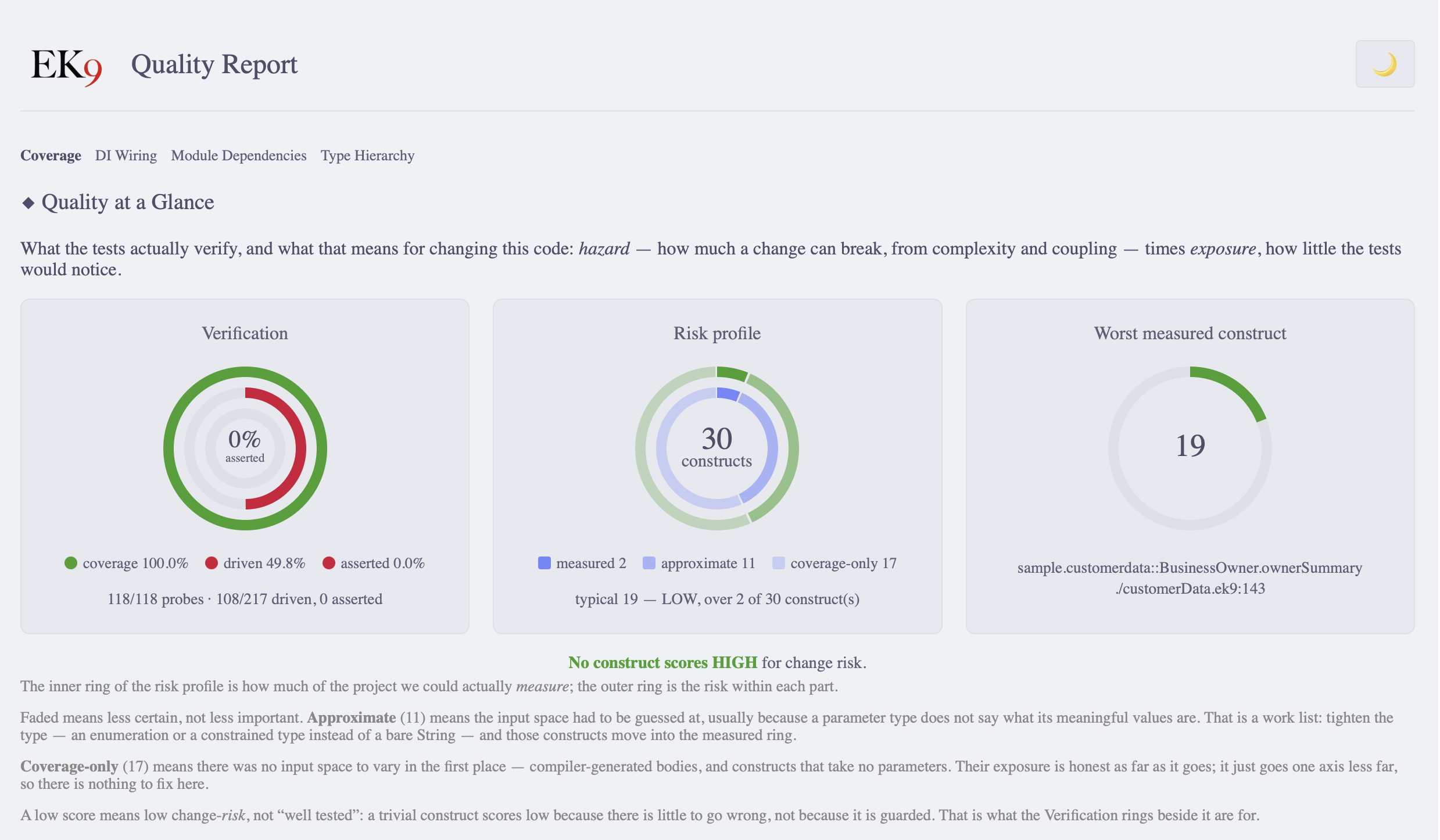
Every report page opens with two readings side by side: what the tests verify, and what that means for changing the code.
- Verification — three concentric rings. Coverage (the code ran) on the outside, then driven (it ran with meaningfully different input), then asserted (something checked the result) at the centre. Each is a narrower claim about the same code, so a full outer ring around an empty centre is a project at 100% coverage that verifies nothing.
- Change Risk (HEX) — hazard (how much a change can break, from complexity and coupling) multiplied by exposure (how little the tests would notice). Risk is where the two meet: complex code that is thoroughly verified is not especially risky, and neither is trivial code that nothing checks.
HEX is an indicator, not a gate. Coverage is the enforced threshold; HEX never fails a build. It exists because a coverage percentage alone does not tell you whether code is safe to change, and it is reported beside the metrics it is computed from, not in place of them.
Input Variety and Change Risk explain the three construct groups, and why a parameter's type decides how well it can be measured.
Source Code Complexity Badges
In the source code view, a quality line above each function or method starts with its complexity, such as
CC:12. The colour shows the band:
| Color | CC Range | Meaning |
|---|---|---|
| Green | ≤10 | Good, maintainable |
| Amber | 11-15 | Consider refactoring |
| Red | >15 | High complexity, should refactor |
Complexity Badge Details
Click a token to expand it. The complexity token gives the cyclomatic complexity, the cognitive
complexity and the nesting depth of that function, with a line on what each measures. When the construct
carries them, further tokens on the same line give its input variety (I:), change risk
(H·E), contracts (C:) and lock payload (L:), each
coloured the same way: greener is better.
File Readability Bars
On module pages, each source file shows a readability bar beside its coverage bar:
Source Files
┌───────────────────────────────────────────────────────────────┐
│ utils.ek9         87.5% ████████░░  14/16   [Readability: 6]  │
│ helpers.ek9       60.0% ██████░░░░  3/5     [Readability: 8]  │
│ validators.ek9    33.3% ███░░░░░░░  2/6     [Readability: 12] │
└───────────────────────────────────────────────────────────────┘
The readability number is the ARI score (1-20 scale). Lower is simpler.
Generating Reports
To generate the HTML quality and coverage report:
ek9 -t6 main.ek9
The report is written to .ek9/coverage/; open its index.html in a browser. See
HTML Coverage Reports for the report's structure and navigation.
Impact on AI-Assisted Development
An AI coding assistant writes code quickly, and without guardrails it writes quality problems as quickly: long functions, needless dependencies, duplication and deep hierarchies copied from its training data. The compiler holds AI-generated code to the same checks as yours:
- Feedback in the loop: the assistant reads the compiler's error and corrects the code;
-E3explains each error in detail - One standard: AI-generated code that compiles has passed the same checks as everything else
- No debate: the compiler, not a reviewer, decides whether the code meets the bar
The design note covers what this means for a team adopting AI assistants.
Complete AI Reference: the For AI Assistants page documents, for AI coding assistants: JSON output schemas, metric thresholds with recommended actions, EK9-specific refactoring patterns, and workflow templates for iterative quality improvement.
Implementation Roadmap
EK9's quality enforcement is being built in phases.
Completed
- Phase 1: Complexity Limits (E11010, E11011, E11013, E11021) — functions, nesting, expressions, cognitive complexity
- Phase 2A: Cohesion Metrics (E11014) — LCOM4 for classes and components
- Phase 2B: Coupling Metrics (E11015) — efferent coupling for all construct types
- Phase 2C: Inheritance Depth (E11019) — all construct types with construct-specific thresholds
- Phase 2D: Size Limits NCSS (E11012) — statement counts for functions (150), methods (100), operators (50)
- Phase 2E: Combined Complexity×Size (E11020) — a product-based threshold for the "both moderately high" case (research: NASA SATC)
- Phase 2F: Construct Misuse Detection (E11022-E11025) — class/component/delegation misuse, including the Blob/God Class (research: Martin SRP, Brown AntiPatterns, Marinescu IEEE ICSM 2004)
- Phase 2G: Module-Level Metrics (E11016, E11017) — module coupling (>10 external modules) and module cohesion (disconnected construct groups) for large modules
- Phase 2H: Naming Quality Enforcement (E11026, E11030, E11031) — alphabetical reference ordering, confusingly similar names (one edit apart, or differing only in case) and non-descriptive variable names
- Phase 2I: Discarded Return Value Detection (E11050, E11051, E11052) — discarded operator returns, discarded pure returns and discarded Result/Optional returns, with no annotation, from the existing purity tracking and operator metadata
- Phase 2J: Named Argument Enforcement (E11061, E11062) — named arguments when 2+ Boolean literals or 4+ arguments are passed positionally, on the existing named argument checks (E06240, E06250)
- Phase 2K: Magic Literal Detection (E11064, E11065) — bare numeric literals at decision points, and repeated String literals (3+ per file, 4+ per module)
- Phase 2L: Tautological Expression Detection (E08082, E08083, E08084, E08085) — constant comparisons, self-cancelling arithmetic, redundant Boolean comparisons and logical tautologies, beside the self-assignment (E08080) and self-comparison (E08081) checks
- Phase 3B: Unused Capture Detection (E11018) — a variable captured by a dynamic function or class and never used
- Phase 4A: Input Security Sanitization — built-in runtime sanitization for SQL injection,
XSS, command injection, path traversal, XXE and SSTI attacks:
- The
sanitizedparameter modifier for automatic sanitization of String parameters on entry to the receiving function or method - The
InputSanitizerclass for explicit sanitization with enterprise logging (JSON, ECS, or CEF format via environment variable)
- The
- Phase 4B (in part): Hard-coded credentials — cloud provider keys, platform tokens, private keys, database URLs with passwords, JWTs and API keys in string literals (E11080-E11084, E11086)
Planned
- Phase 3A: Duplicate Code Detection — IR-based similarity analysis (>70% = error)
- Phase 4B (the rest): Compile-Time Security Pattern Enforcement — insecure configuration patterns
- Phase 5: Style Enforcement — consistent formatting as part of compilation
Deferred (Requires IR Generation Completion)
- Afferent Coupling (Ca) — "who depends on this construct" analysis
- Module Instability — Ca/(Ca+Ce) ratio calculations
Summary
EK9 makes code quality mandatory rather than optional, so the debt a warning would have recorded cannot build up.
The EK9 Guarantee: if your code compiles, it has passed every enforced check on this page: complexity, cohesion, coupling, inheritance depth, naming and the rest. None of them can be configured away, and none is a warning.
Next Steps
- See the Error Index for every quality error code (the E11xxx family and the others linked above)
- Learn about composition and delegation as an alternative to deep inheritance
- Explore packaging to understand how EK9 manages dependencies
- Review command line options including the
-E0to-E5error verbosity levels - Use Test Generation for compiler-driven edge-case testing and mutation analysis