Compiler Fuzzing in EK9
EK9 ships with a grammar-based fuzzer that generates random EK9 programs, compiles them, and records error code coverage, how far each program got through the compiler, and any compiler crashes. It is for compiler quality assurance: checking that the compiler handles every input gracefully.
It is built into the compiler so that anyone can test the compiler. If you find a crash or another problem, let us know and send the EK9 source that caused it, so we can fix it. New versions of the compiler are built weekly, so a fix does not take long.
Looking for test generation? To generate tests for your code, see Test Generation. This page is about the fuzzer that tests the compiler itself.
- What is Compiler Fuzzing? - why it matters
- Running the Fuzzer - CLI flags and format options
- Five-Strand Generation Strategy - how programs are generated
- Output Formats - human, JSON, HTML, CI
- Reading the Dashboard - the dashboard sections explained
- Best Practices - getting the most from fuzzing
What is Compiler Fuzzing?
The EK9 compiler runs a pipeline of 23 phases, reports several hundred distinct error codes, and handles dozens of kinds of construct that interact with each other. Grammar-based fuzzing works through that by generating random but structurally plausible EK9 programs and compiling them.
The fuzzer answers three questions:
- Crash detection - does the compiler crash on any generated input? The source of each crash is
saved to
./fuzz-crashes/for investigation. - Error code coverage - how many of the compiler's error codes does it trigger? A code never triggered is an untested error path.
- Phase penetration - how far through the pipeline do the programs get? Programs that reach later phases exercise more of the compiler.
Running the Fuzzer
The fuzzer runs for the number of minutes you give it, generating and compiling programs continuously:
$ ek9 -fuzz 30  # 30 minutes, human-readable output
$ ek9 -fuzz0 30  # Terse CI pass/fail (one line)
$ ek9 -fuzz2 1440  # 24 hours, JSON for pipelines
$ ek9 -fuzz6 60  # 1 hour, HTML dashboard
The format suffixes (-fuzz0, -fuzz2, -fuzz6) follow the test format suffixes (-t0, -t2, -t6): each action owns its format suffixes.
Crash sources are always saved to ./fuzz-crashes/, whatever the output format. The HTML dashboard is written to ./fuzz-report/.
Five-Strand Generation Strategy
The fuzzer generates programs in five different ways, called strands. Each strand produces a different mix of errors, and together they exercise more of the compiler than any one of them could. All five start with an equal share of the programs, and the fuzzer then moves the shares towards whichever strands are finding something (see Adaptive Weight Timeline).
Strand 1: Template-Based ATN Generation
Built-in templates for common EK9 patterns (classes, functions, traits, records and so on) are filled in by walking the EK9 grammar's ANTLR4 Augmented Transition Network (ATN), making a random choice at each decision point. This strand produces the most syntactically correct programs.
Strand 2: Compiler-Aware Injection
This strand compiles the Q&A example files, harvests their real symbols, and injects them into generated programs. Real type names, method signatures and module structures reach the deeper semantic phases that purely random programs rarely get to.
Strand 3: Template Mutation
This strand takes working Q&A example files and makes one change to each: dropping a modifier, swapping a type, changing an operator, altering indentation, duplicating a line, injecting a boolean literal, stripping a guard or swapping two adjacent statements. These targeted changes reach specific error checks (E08010, E08030, E08081, E11050 and others) that random generation is unlikely to trigger.
Strand 4: Targeted Mutation
This strand applies the known-incorrect substitutions in the Q&A system's typicalErrors
entries. Each one replaces a correct snippet with its incorrect counterpart and checks that the compiler
reports the expected error code. Mismatches are saved to fuzz-crashes/strand4-mismatches/ for
investigation.
Strand 5: Template Enrichment
This strand combines one to four working Q&A templates into a single module, takes their type and function definitions, and generates a program body with deeply nested control flow (if/else, switch, for, while, try/catch, streams) over those real types. It fills the gap between Strand 1 (random programs that stop at FULL_RESOLUTION) and Strand 2 (flat probe calls): semantically valid types inside complex nesting reach deeper phases such as IR_GENERATION and CODE_GENERATION. 15% of enriched programs also get a random mutation, for error path coverage.
| Strand | Strength |
|---|---|
| 1. Template-Based ATN | High volume, broad grammar coverage, many parse errors to test the parser's robustness |
| 2. Compiler-Aware | Deeper phase penetration; exercises type resolution and semantic checks |
| 3. Template Mutation | Targeted error code coverage; exercises specific detection logic |
| 4. Targeted Mutation | Checks known errors, records mismatches, covers typicalErrors |
| 5. Template Enrichment | Types interacting, nested control flow, deep phase penetration |
Multi-Strand Filtering and Ablation Studies
By default all five strands run. Combine the -s1 to -s5 flags to run any subset:
$ ek9 -fuzz6 30 -s1  # S1 only (grammar baseline)
$ ek9 -fuzz6 30 -s1 -s2  # S1 + S2 (grammar + symbol oracle)
$ ek9 -fuzz6 30 -s1 -s2 -s3  # S1 + S2 + S3 (add mutation)
$ ek9 -fuzz6 30 -s1 -s2 -s3 -s4  # S1 + S2 + S3 + S4 (add targeted)
With several strands active, the adaptive weights share the programs among them; strands that discover more error codes get more. A single strand gets every program.
This is how you run an ablation study: compare the error coverage of S1 alone with S1+S2, S1+S2+S3 and so on, and you have each strand's marginal contribution. The HTML dashboard shows the differences in its Strand Effectiveness, Adaptive Weight Timeline and phase penetration charts.
Output Formats
Human-Readable (-fuzz)
The default format prints a progress line every 30 seconds, then a final report to stdout with terminal
histograms (phase reached, argument counts, construct coverage, error codes). Use it to watch a run during
development. The excerpt below is from a real one-minute run, ek9 -fuzz 1. A fuzz run is random
and timed, so every count differs from run to run, and its output is shown as an excerpt rather than as a
captured golden:
EK9 Grammar Fuzzer started. Duration: 1m Workers: 9
Crash files will be saved to: ./fuzz-crashes
Templates loaded: 1227 (S2: 20%, S3: 20%, S5: 20%)
Targeted files: 1101 (1774 mutations, S4: 20%)

[02:08:39] 12,773 programs | 421/sec | Parse: 86.5% | MultiFile: 22% | Errors: 363/416 (codes) | Constructs: 77 | CtrlFlow: 36 | Fixes: 22 | Crashes: 0 | Known: 0 | S4: 3568/3568 (100%) | Heap: 3,248MB/30,688MB (peak 3,248MB)
[02:09:09] 25,084 programs | 416/sec | Parse: 87.5% | MultiFile: 20% | Errors: 381/416 (codes) | Constructs: 77 | CtrlFlow: 36 | Fixes: 43 | Crashes: 0 | Known: 0 | S4: 8562/8562 (100%) | Heap: 1,769MB/30,688MB (peak 3,248MB)

=== EK9 Grammar Fuzzer — Final Report ===

Duration:          1m 0s
Programs generated: 25,085
Programs/second:   415.7
Source size (lines): min 2, avg 104.6, max 2572

Parseable:         21,951 (87.5%)
Compiled:          5,372 (24.5% of parseable)
Compiler crashes:  0
Known limitations: 0
Formatter crashes: 0
Dup corrections:   43

=== Phase Distribution ===
  SYMBOL_DEFINITION                    2640 ( 12.0%) ####
  DUPLICATION_CHECK                     232 (  1.1%)
  REFERENCE_CHECKS                      184 (  0.8%)
  EXPLICIT_TYPE_SYMBOL_DEFINITION      1620 (  7.4%) ##
  TYPE_HIERARCHY_CHECKS                  30 (  0.1%)
  FULL_RESOLUTION                      9220 ( 41.9%) ################
  POST_RESOLUTION_CHECKS                 93 (  0.4%)
  PRE_IR_CHECKS                        2603 ( 11.8%) ####
  APPLICATION_PACKAGING                5372 ( 24.4%) #########
Terse CI (-fuzz0)
One pass/fail line for a CI gate. The exit code is 0 when no new crashes were found, and 15 (fuzzing found
one or more compiler crashes) when any were, whatever the output format. From the same kind of one-minute run
(ek9 -fuzz0 1), after the start-up lines:
PASS: 0 crashes, 0 known, 382/416 errors, 24,061 programs in 1m 0s
JSON (-fuzz2)
Writes two files for programmatic analysis, in the crash directory (./fuzz-crashes/):
- fuzz-report.json - the final summary with every statistic
- fuzz-snapshots.jsonl - snapshots over time, one JSON object per line, for tracking the metrics through a run
Part of fuzz-report.json from a one-minute run: the headline fields, each count map trimmed to
its first entries (the file also holds control-flow, template, strand and heap figures):
{
  "timestamp": "2026-10-09T02:11:24",
  "release_gate": {"verdict": "PASS", "crashes": 0, "error_coverage_pct": 90.9},
  "duration_seconds": 60,
  "generated": 21014,
  "parseable": 18299,
  "compiled": 4402,
  "compiler_crashes": 0,
  "known_limitations": 0,
  "formatter_crashes": 0,
  "programs_per_sec": 347.6,
  "parseable_pct": 87.1,
  "compiled_pct": 24.1,
  "unique_error_codes": 378,
  "total_error_codes": 416,
  "error_code_counts": {"E50060": 5079, "E50010": 4359, "E50001": 2649},
  "phase_reached_counts": {"FULL_RESOLUTION": 7549, "APPLICATION_PACKAGING": 4402},
  "construct_counts": {"constant": 868, "references": 540, "program": 385}
}
HTML Dashboard (-fuzz6)
Writes an interactive dashboard to ./fuzz-report/index.html with charts, heatmaps and drill-down details. It is the richest format and the one to review a run with.
Reading the Dashboard
The dashboard (-fuzz6) has more sections than this page covers. The main ones are below, each
with the figures to watch.
Status Banner and KPI Cards
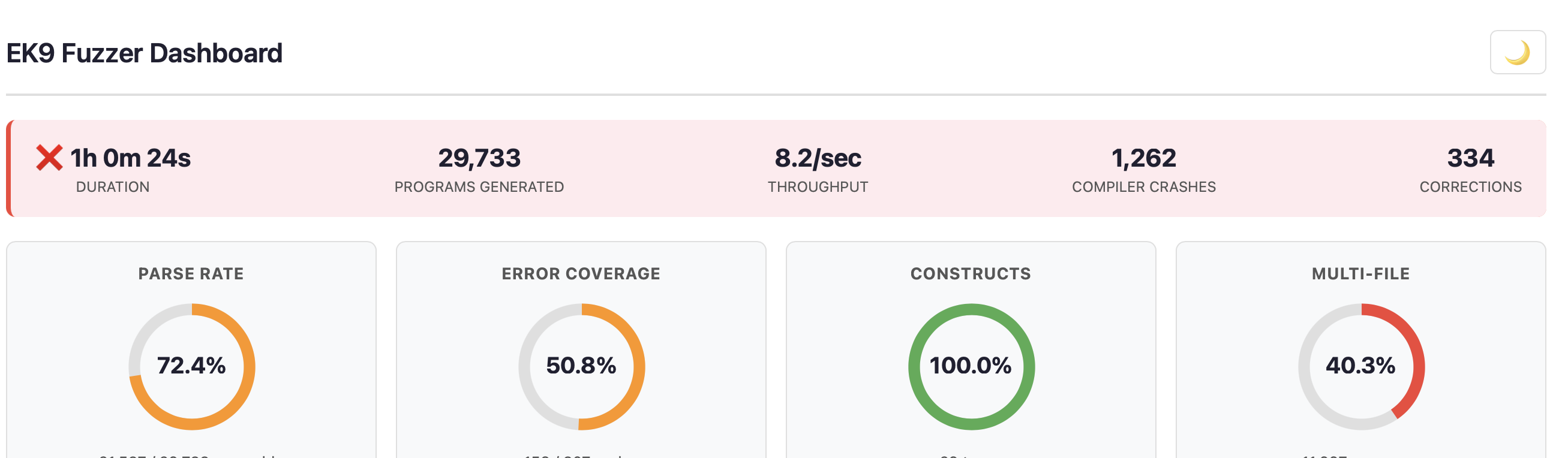
The status banner shows the duration, programs generated, throughput, crash count and corrections. Its border colour gives the overall health: green for no crashes, amber for one to four, red for five or more.
Four KPI donut charts give the headline figures:
- Parse Rate - the share of generated programs that parse. Higher is better for exercising the semantic phases, but some parse failures are expected, and useful for testing the parser's error recovery.
- Error Coverage - the share of the compiler's error codes triggered. The aim is to exercise as many error paths as possible.
- Constructs - how many kinds of construct the run generated (class, function, record, trait, service and so on).
- Multi-File - the share of programs that span several files, testing cross-module scenarios.
Timing Breakdown and Source Statistics


Three small donuts show where the time goes: generation, parse checking and compilation. The source statistics give the minimum, average and maximum lines per program, the total bytes generated, file counts and the compile rate.
- Compilation dominates: programs are reaching deep phases (good).
- Parse checking dominates: most programs fail early; consider changing the generation strategy.
Phase Distribution
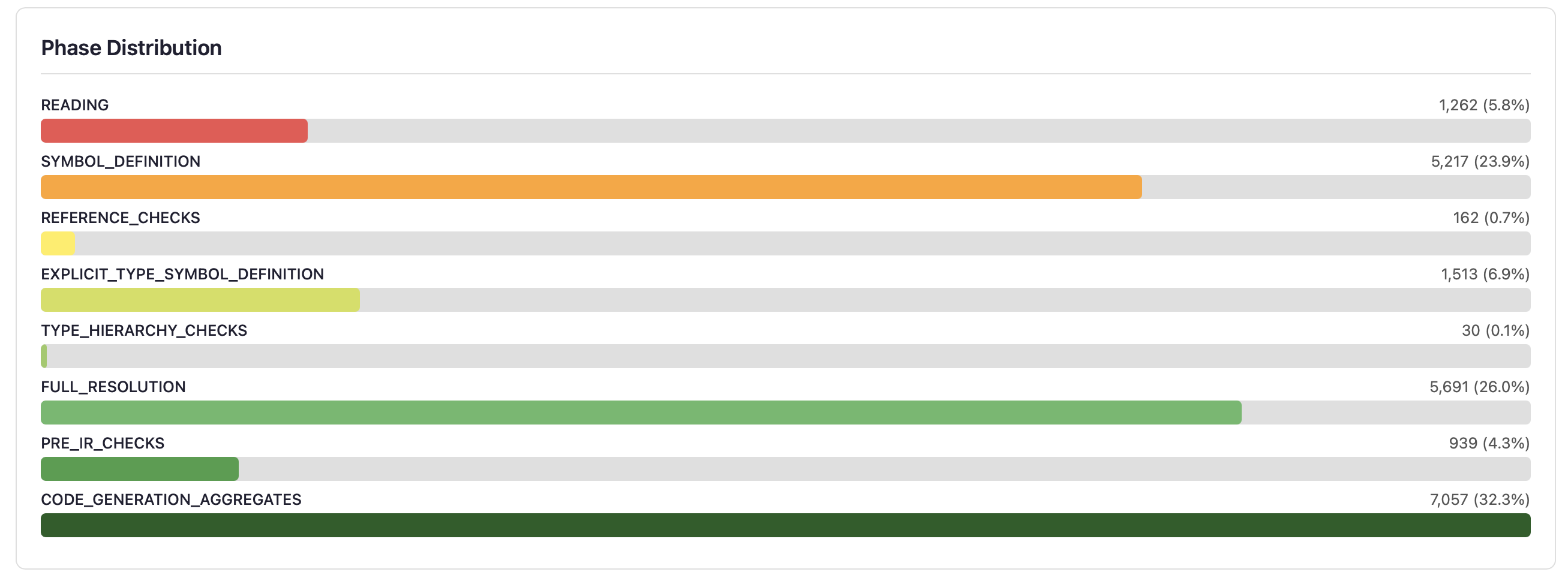
Horizontal bars show how far programs get through the compiler's phases. Each bar is a phase where programs were rejected; a program that passes a phase moves on to the next bar. A healthy distribution spreads programs across all the phases rather than bunching them at the front.
The phase penetration funnel shows the same data another way: each bar's width is the fraction of programs that survive to that phase, with the dropout percentage between phases:
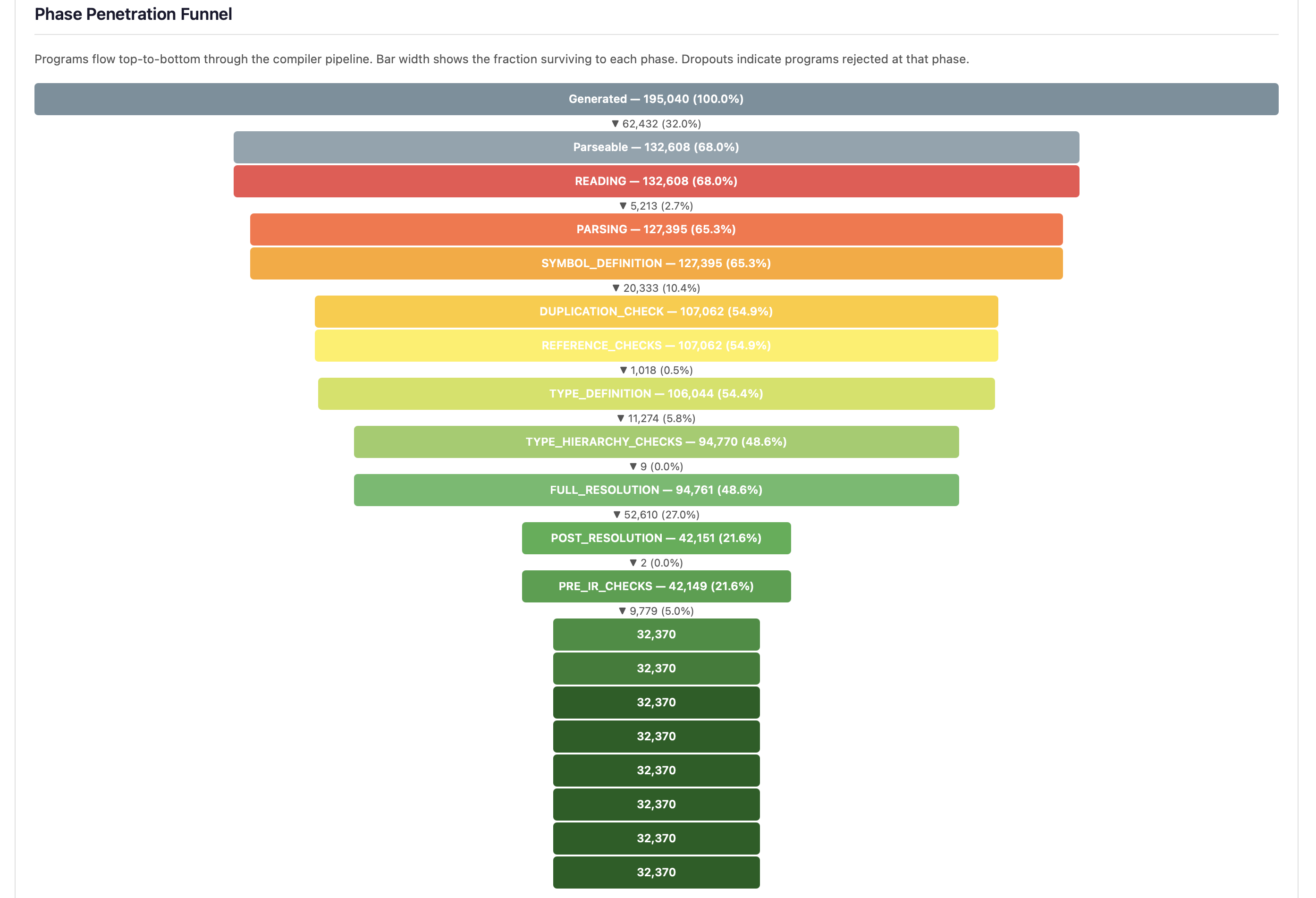
The three largest dropouts (parsing, FULL_RESOLUTION and SYMBOL_DEFINITION) show where generated programs are most often rejected. A steep drop at FULL_RESOLUTION, the largest, means type resolution is the main barrier to deeper testing.
- Early phases (READING, SYMBOL_DEFINITION) - programs with syntax or basic structural errors, expected from random generation.
- Middle phases (REFERENCE_CHECKS to PRE_IR_CHECKS) - programs with type errors, unresolved references or semantic problems. These exercise the type system.
- Late phases (CODE_GENERATION onwards) - programs that pass every front-end check. A crash here is a code generation bug.
Error Code Coverage Heatmap
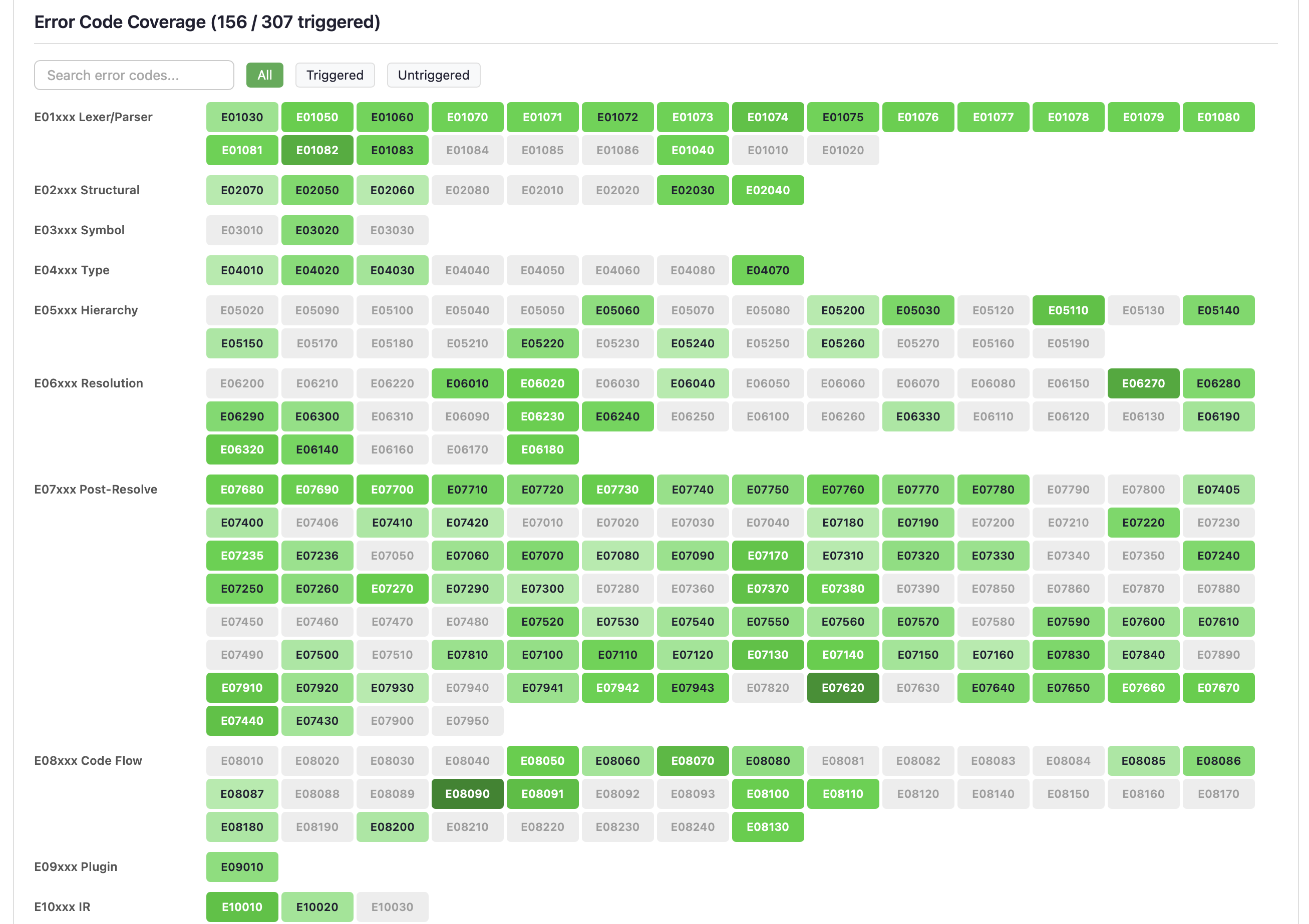
The largest section shows every compiler error code as a grid you can search and filter, grouped by category (E01xxx Lexer/Parser, E05xxx Hierarchy, E06xxx Resolution and so on).
- Green cells - the code was triggered. Darker green means more hits.
- Grey cells - the code was not triggered: an untested error path that may need a targeted generation strategy.
- Red crash badges - the code came with a compiler crash, not only an error.
Search for a code, or use the filter buttons (All / Triggered / Untriggered) to look at the gaps.
Construct Coverage

A heatmap of the kinds of construct generated: class, function, record, trait, service, component, program, enumeration, generic type, dynamic class, dynamic function and more. The colour shows how often each was generated. A red-bordered, pulsing cell is a construct that has crashed the compiler.
The aim is even coverage across the construct types. If some are under-represented, the generation templates may need adjusting.
Control Flow Coverage
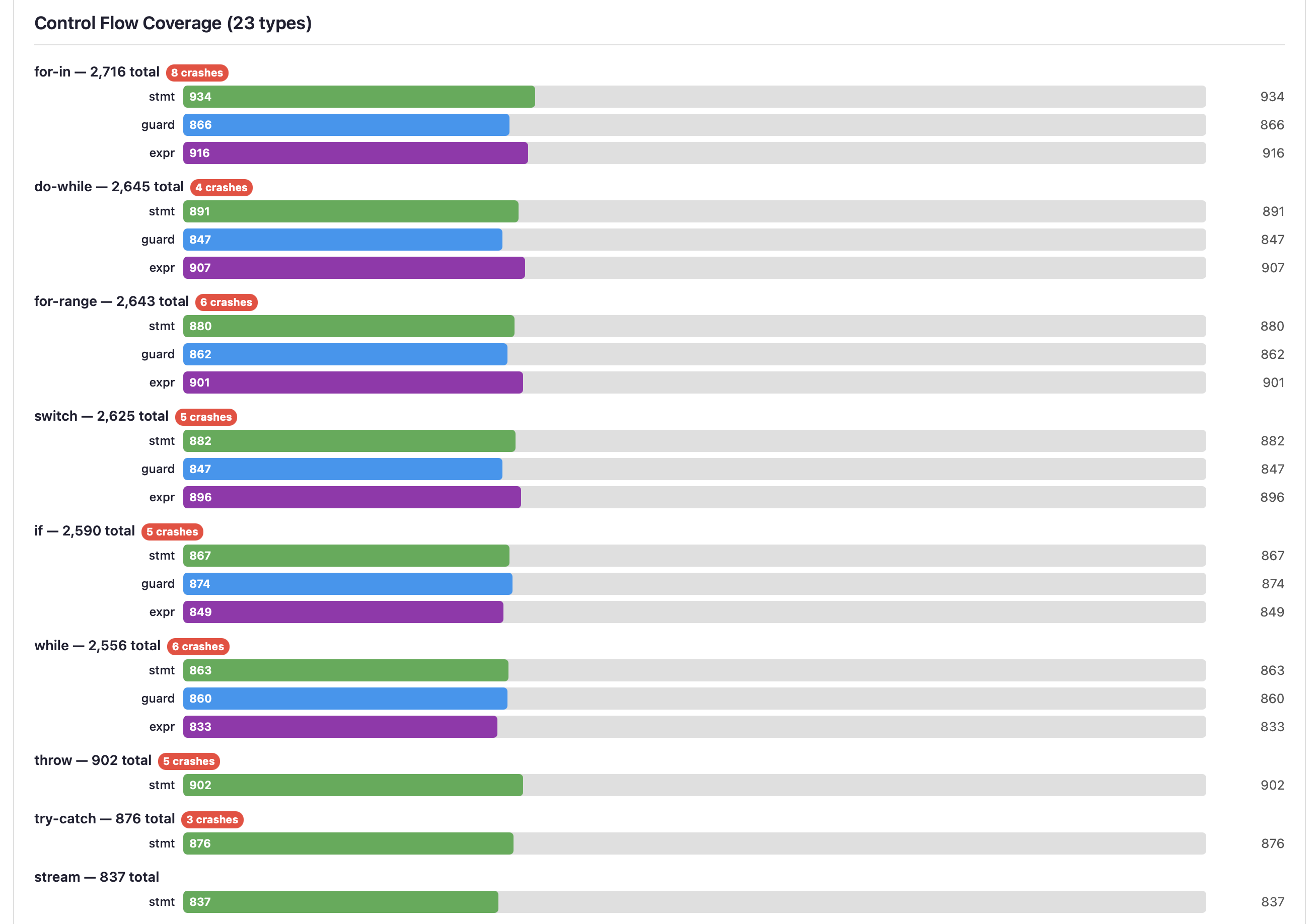
Grouped horizontal bars for each kind of control flow (for-in, do-while, for-range, switch, if, while, throw, try-catch, stream and so on). Each has three sub-bars:
- stmt (green) - the statement form (for example
if condition) - guard (blue) - the guard form (for example
if x <- getValue()) - expr (purple) - the expression form, used in assignments
Crash badges on a control flow type show where the compiler is weakest. Stream operations and deeply nested constructs often reveal the most interesting bugs.
Argument Count Distribution

How often generated functions and methods take each number of arguments, from 0 to 25+. A realistic distribution has most functions with 0-3 parameters and fewer as the count rises; the edge cases at 15 and over stress the compiler's parameter handling.
Template Usage
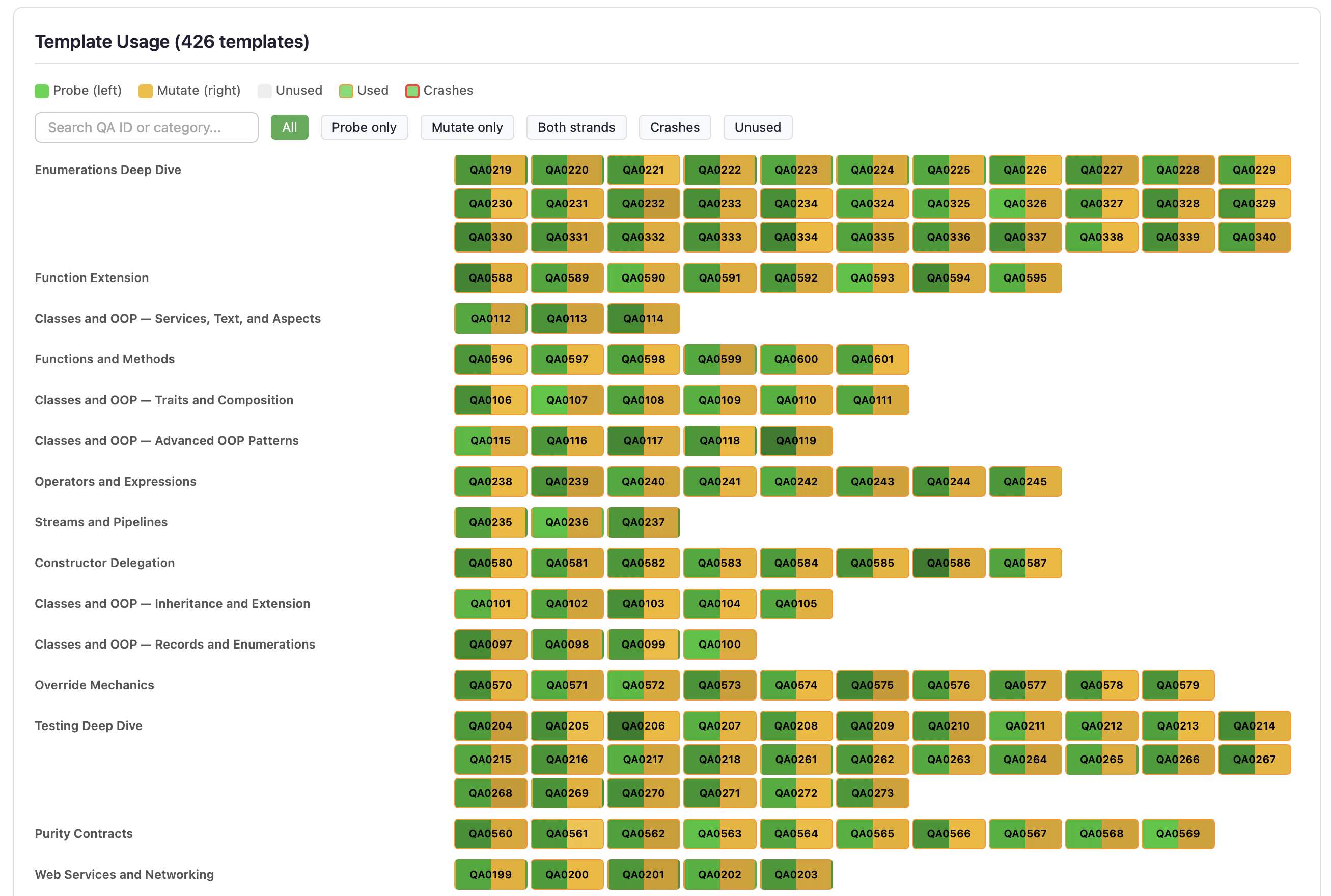
How much each Q&A example template was used by Strand 2 (injection), Strand 3 (mutation) and Strand 5 (enrichment). It shows the underused templates that may need attention.
Per-Strand Phase Distribution
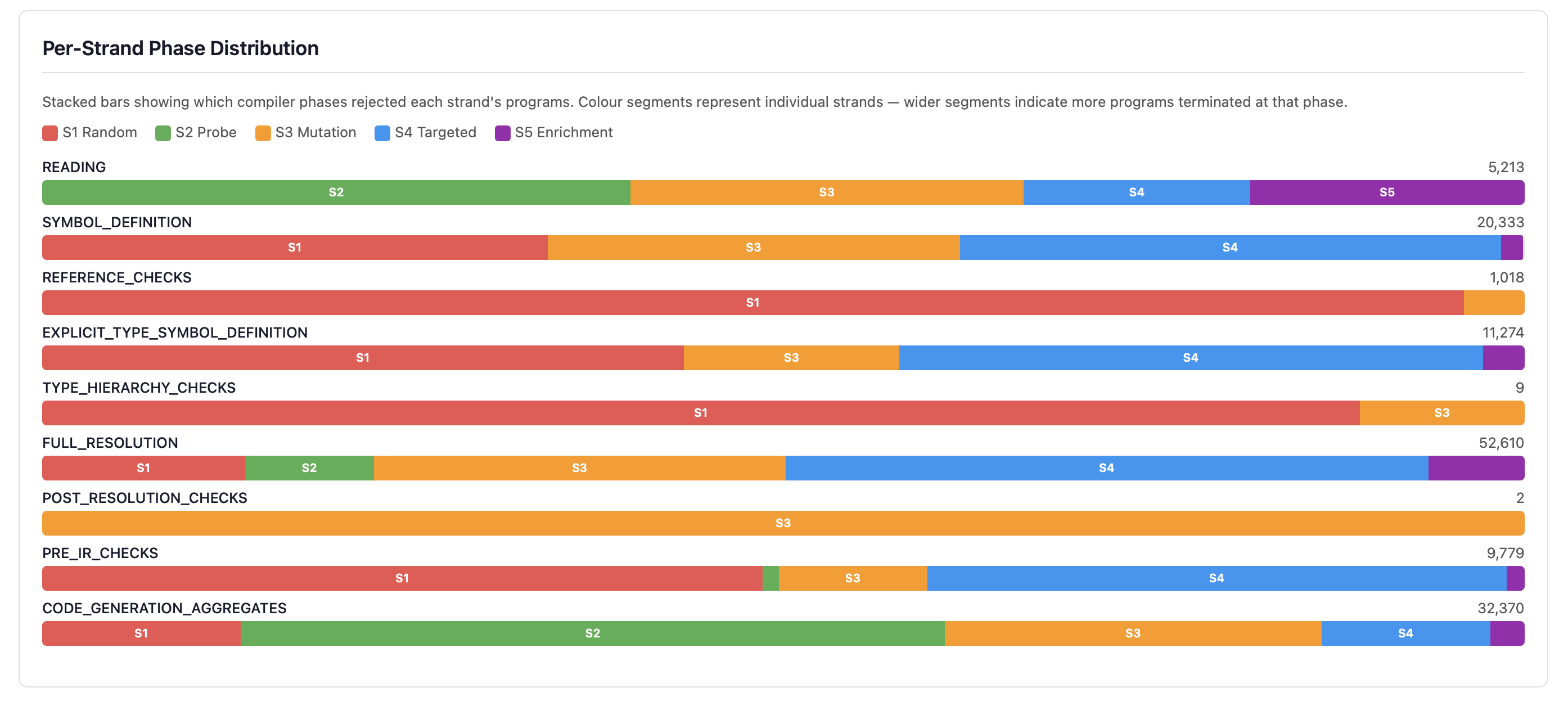
Stacked horizontal bars show how each strand contributes to the programs at each phase. Each bar is coloured by strand (S1 red, S2 green, S3 amber, S4 blue, S5 purple), so you can see which strategy dominates at each depth.
Each strand also has its own section of figures, and the same figures are in fuzz-report.json:
- Harvest health (Strand 2) - how many Q&A templates were parsed and harvested for symbols. Many failures suggest stale templates.
- Hierarchy reverts (Strand 5) - generated inheritance that was reverted because it did not fit (an operator conflict, a constructor mismatch).
- Weight adjustments (
weight_adjustmentsin the JSON) - how often the adaptive dispatch changed the strand weights. - Blind-spot hits (Strand 1) - programs from the blind-spot generator that triggered a code not triggered before, out of the attempts.
Strand Effectiveness Comparison
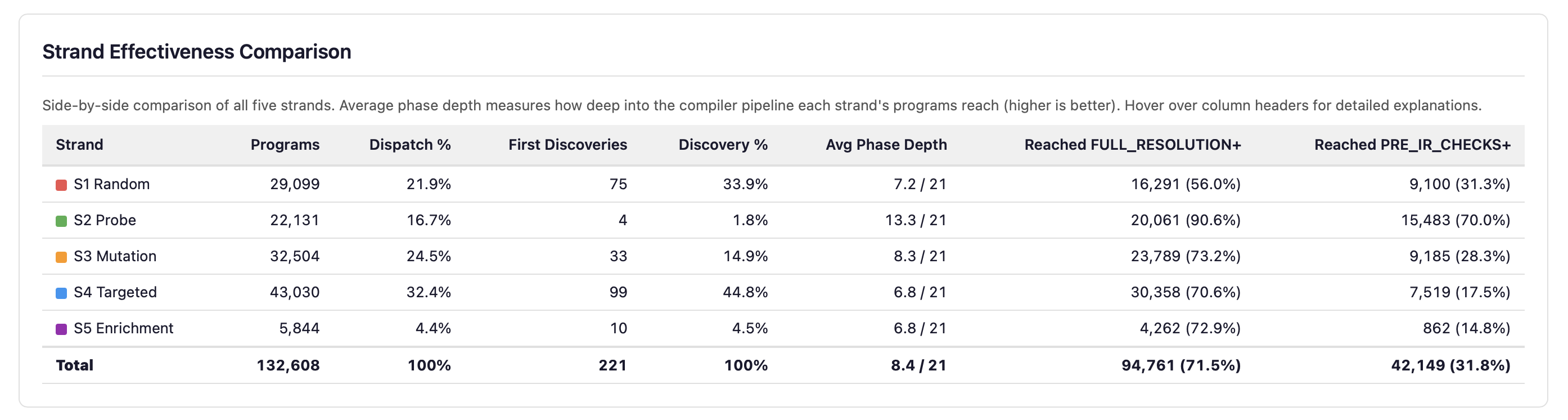
Each strand's figures side by side: program count, share of dispatch, first discoveries, average phase depth and pipeline penetration. Depth and breadth of discovery are independent: the strand that gets deepest is not the one that discovers the most new error codes.
Adaptive Weight Timeline
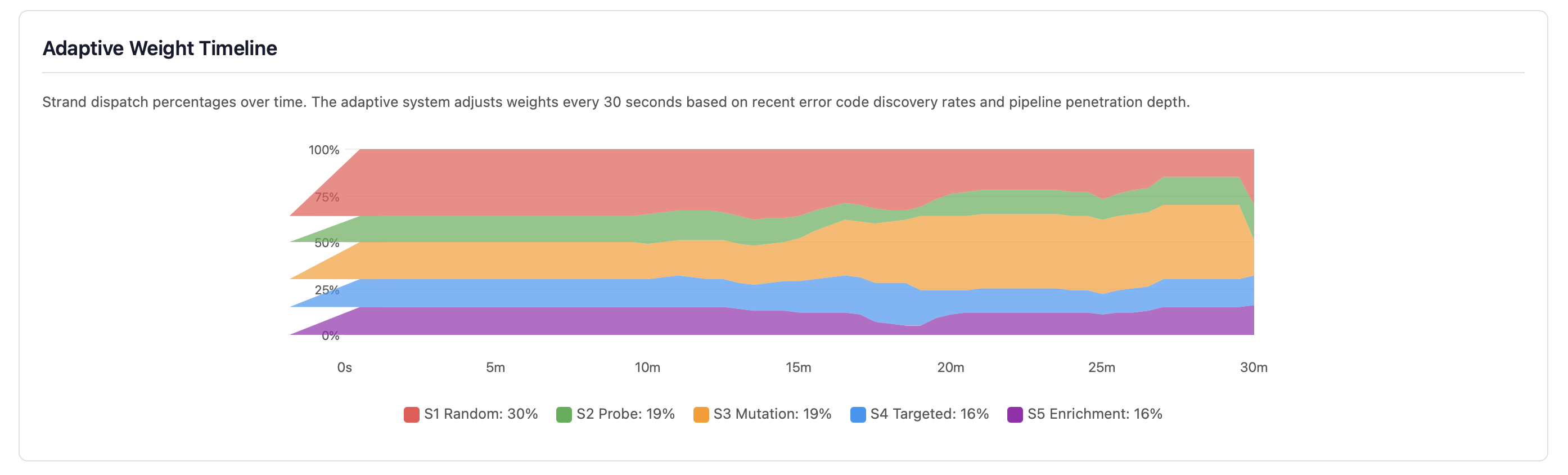
Each strand's share of the programs over time. Every 30 seconds the fuzzer re-weighs the strands, except in the first third of the run; over the second third the change is phased in gradually. The weighting: while error codes are being discovered, by each strand's recent discoveries; once discovery stalls, by how deep each strand's programs get. A strand's weight stays between 5 and 40 (of 100), so a strand that plateaus loses share to more productive ones but is never switched off.
Strand 4: Targeted Mutation Statistics
Strand 4's known-error mutations in detail, one card each:
- Match Rate - the share of mutations where the compiler reported the expected error code. A high
rate means the compiler reliably catches the known-incorrect patterns of the Q&A
typicalErrorsentries. - Mismatches - mutations that produced an error, but a different code from the one
expected. They are saved to
fuzz-crashes/strand4-mismatches/; they may show a check that fires at a different phase than expected. - No Error - mutations the compiler accepted without any error. These are surviving mutants: possible gaps in the compiler's error detection.
- Skips - mutations that changed nothing, because the correct snippet was not in the template chosen.
- Compound - when a single mutation survives (compiles clean), mutations from the template mutation generator are layered on top. This counts how many of those compound mutations triggered the expected error, out of the attempts.
- Survivors - surviving mutants fed back to Strand 3 as input. Programs the compiler wrongly accepted are mutated further to find related weaknesses.
Error Code Convergence
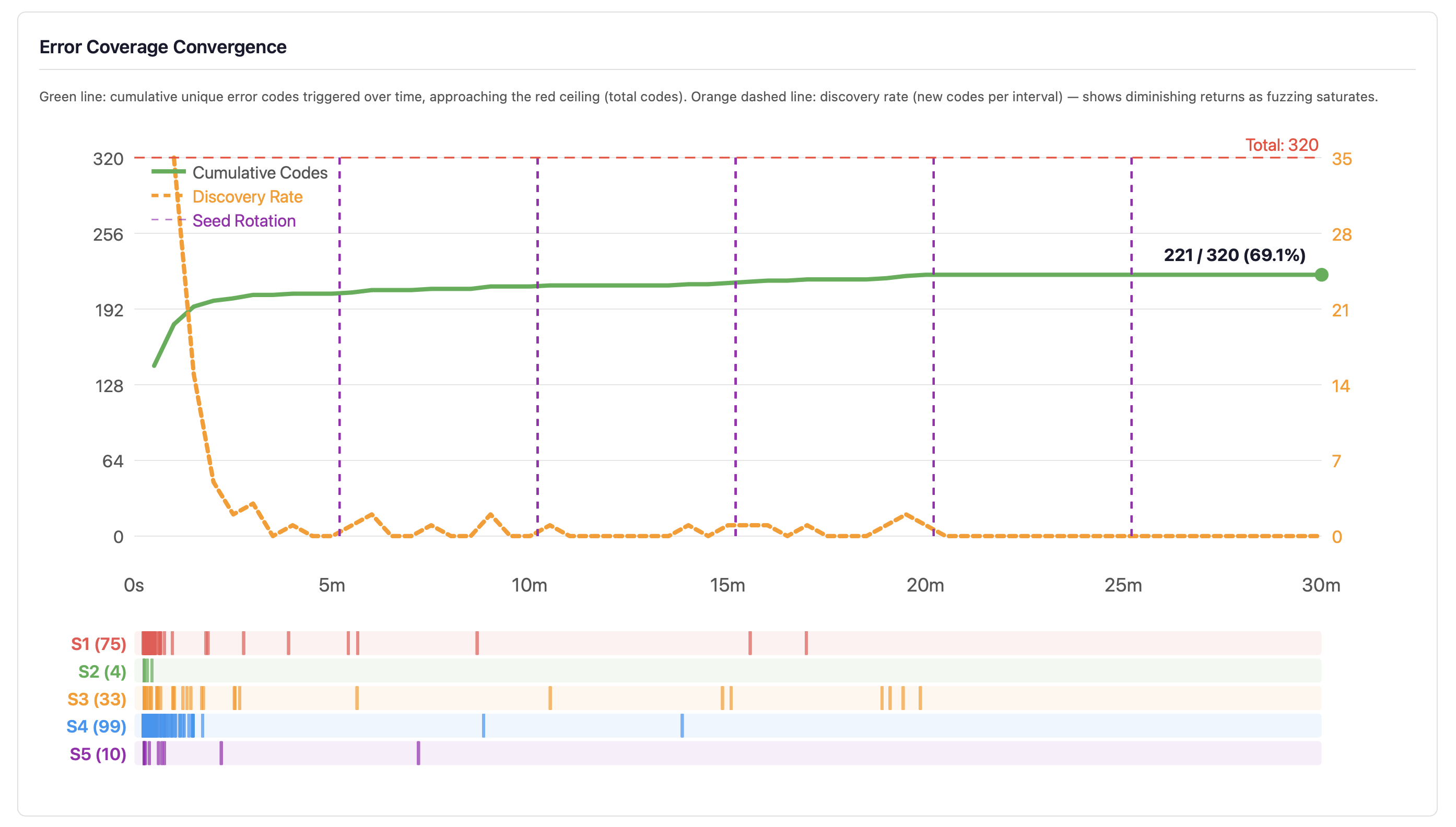
The convergence curve plots the unique error codes triggered so far (green line) against the total number of codes (red dashed line), with the discovery rate laid over it (orange dashed line). The strip at the bottom shows each strand's discoveries in its own colour.
When the discovery rate nears zero, often within minutes, more fuzzing at the same settings will not improve error code coverage. Do not fuzz longer at the same settings; change the strategy: improve the generators, add new strands, or target specific untriggered codes. But error codes saturating does not mean bugs are saturating: the combinations within each error category remain vast, and longer runs explore more of them.
Best Practices
- Run 24/7, not 5 minutes. Stochastic testing is probabilistic: a short run may miss rare crash conditions. The fuzzer is designed to run continuously.
- Check the statistics daily. The dashboard is a monitoring system. Check that error coverage is growing, that constructs are exercised evenly, and that no new crash patterns have appeared.
- Keep the crash file. The fuzzer reseeds its random generators from the clock, every five minutes,
so a run cannot be replayed. The source saved in
./fuzz-crashes/is what reproduces a crash: compile it on its own. - Use the dark mode toggle. The dashboard has a dark/light toggle for late-night monitoring.
Why EK9 does it this way. The statistics are the product, not the crash files. Crashes matter, but the real value is knowing how much of the compiler has been exercised: a clean run with low error coverage is worse than a crashy run with high coverage.
See Also
- Test Generation - edge-case tests and mutation variants for your code
- Testing - test types, assertions, test runner commands
- Code Coverage - threshold enforcement, quality metrics, HTML reports
- Command Line - all flags and exit codes
- For AI Assistants - machine-readable output schemas