Getting Started with EK9 · Chapter 6
Reading the Compiler's Guidance
This short chapter is about a habit rather than a feature of the language: how to read what the compiler tells you, and treat each message as your next step. Once you can read the compiler, you can teach yourself much of the rest.
An error is an instruction
When a program will not build, the natural reaction is "I did something wrong". In EK9 an error is better read as: here is the next thing to fix, and here is where it is. The compiler found the problem now, while you are looking at the code, instead of leaving it to surface later.
So when you see an error, do not guess and change things at random. Read it. EK9's messages are written to be read, and they carry more than "something is wrong".
The anatomy of a message
Here is a real error. The program that caused it comes in a moment; first, look at the shape of the message. This is everything the compiler prints:
ek9: compilation failed (exit 8)
EK9     : PRE_IR_CHECKS: Errors in ./tautology.ek9
EK9     : Error   : E08086: '<' on line 9 position 21: 'temperature < 18': condition is always true based on data flow analysis
             See: ek9 -h E08086
EK9     : Compilation failed
The first line says the build failed, and the second names the file and the stage of checking that
found the problem. The lines that matter are the Error line and the See: line under it. Each part
has a job:
E08086— the error's code: a stable name you can look up, quote or search for. Every distinct rule has one.'<' on line 9 position 21— where: the exact token, line and column.'temperature < 18'— the offending piece, quoted back to you, so you know which part it means without counting characters.condition is always true ...— the explanation: what is wrong and why.See: ek9 -h E08086— how to learn more. Every message tells you how to get the full explanation, covered below.
With those five parts in view, an EK9 error is a location, a snippet, a reason, and a pointer to more help.
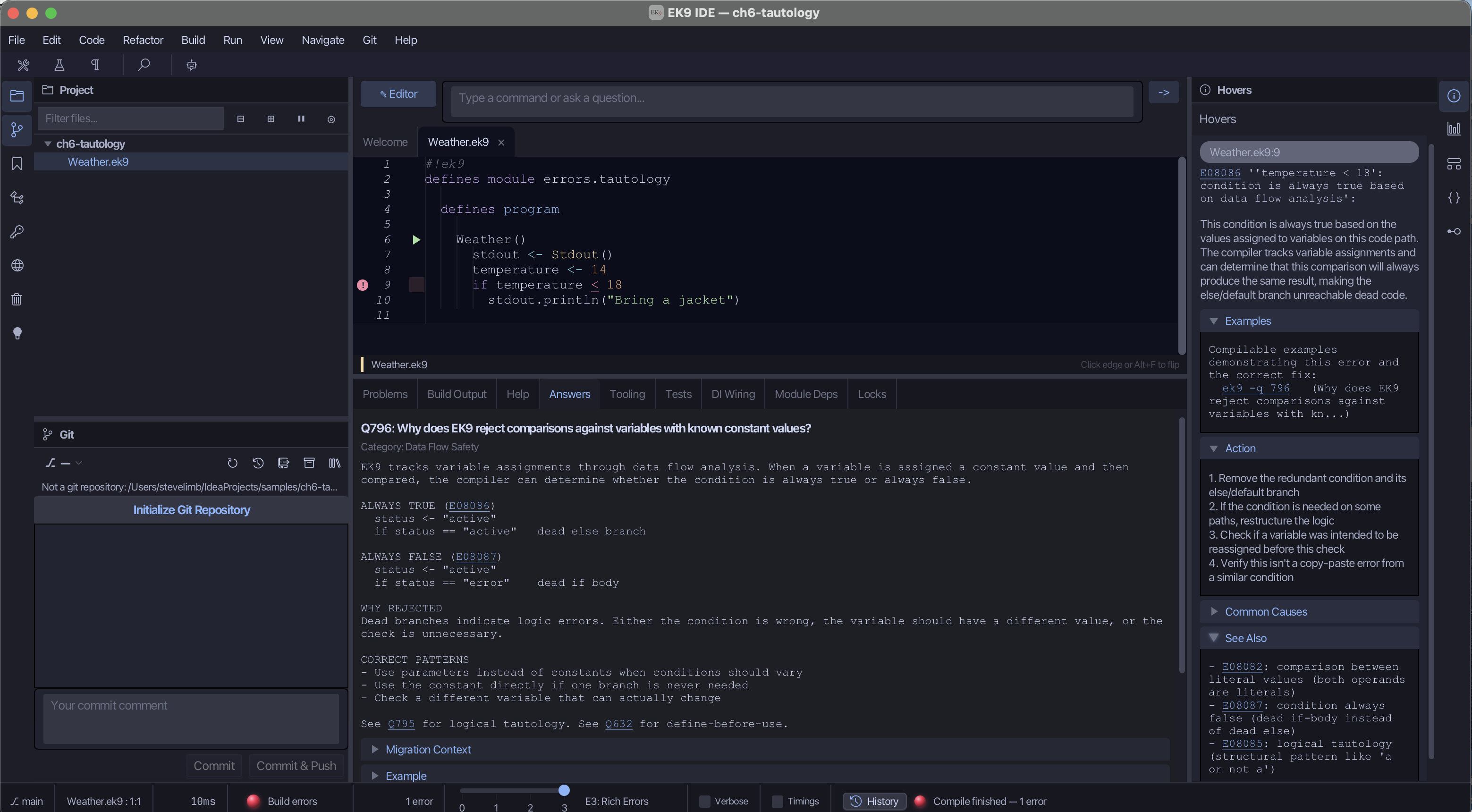
Here is the same error in the IDE:
Four errors you will meet
Here are four mistakes beginners make. Each is a small, broken program, shown with its message, what the message means, and the fix. The point is not to memorise them but to see the pattern of reading and responding.
The condition that is always true
temperature <- 14
if temperature < 18
  stdout.println("Bring a jacket")
EK9     : Error   : E08086: '<' on line 9 position 21: 'temperature < 18': condition is always true based on data flow analysis
             See: ek9 -h E08086
(From here on, only the Error line and the lines under it are shown.) temperature is set to
14, then the program asks whether it is below 18. It always is. The compiler followed the
values and saw that the if can only go one way, so the check is pointless and the unwritten
"else" can never run. The fix is the one from Making Decisions and Repeating Work: let the value
come from outside the program — an argument, an input, a real reading — so the answer is unknown
until the if runs.
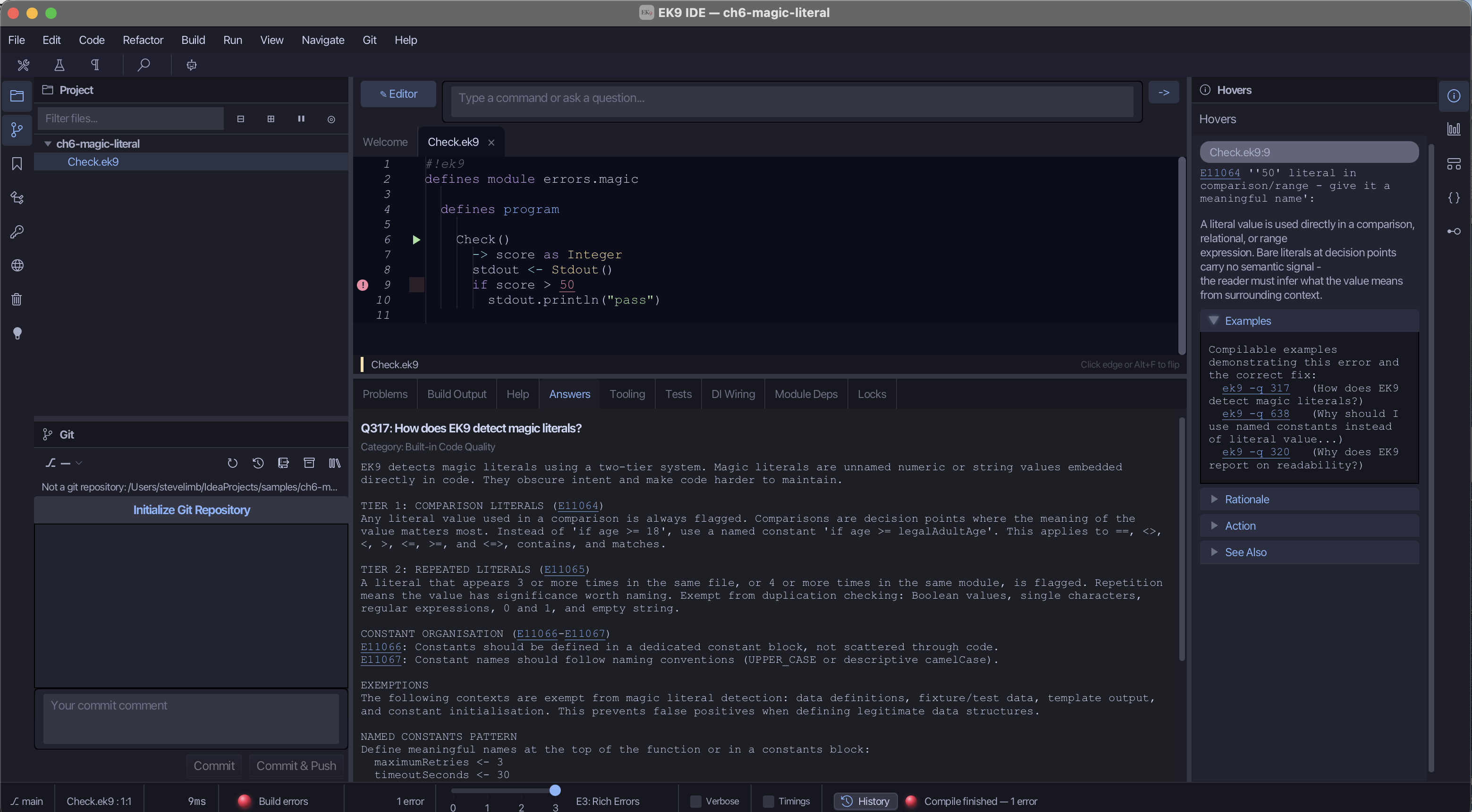
The magic number at a decision
Check()
  -> score as Integer
  if score > 50
    stdout.println("pass")
EK9     : Error   : E11064: '50' on line 9 position 17: '50' literal in comparison/range - give it a meaningful name
             See: ek9 -h E11064
Here score does come from outside, so the condition is fair. The complaint is the bare 50. A
raw number at a decision point does not tell the reader why fifty. The fix is to give it a name
that says what it means:
Check()
  -> score as Integer
  passMark <- 50
  if score > passMark
    stdout.println("pass")
Now the line states its intent, and if the pass mark changes there is one place to change it.1
Changing a value inside pure
tally() as pure
  -> start as Integer
  <- result as Integer: start
  running <- start
  running := running + 1
  result: running
EK9     : Error   : E08100: ':=' on line 10 position 14: 'running as Integer': reassignment not allowed when scope is marked as 'pure' (':=?' is supported)
             See: ek9 -h E08100
           forAI: purityRules
The function is marked pure, which, as Functions explained, means each value is set once and
not reassigned. The line running := running + 1 breaks that promise. The message also names the
operator you can use, :=?. Here the simplest fix is to compute the value once instead of
changing it:
tally() as pure
  -> start as Integer
  <- result as Integer: start + 1
Indentation that does not line up
Greeting()
stdout <- Stdout()
stdout.println("hello")
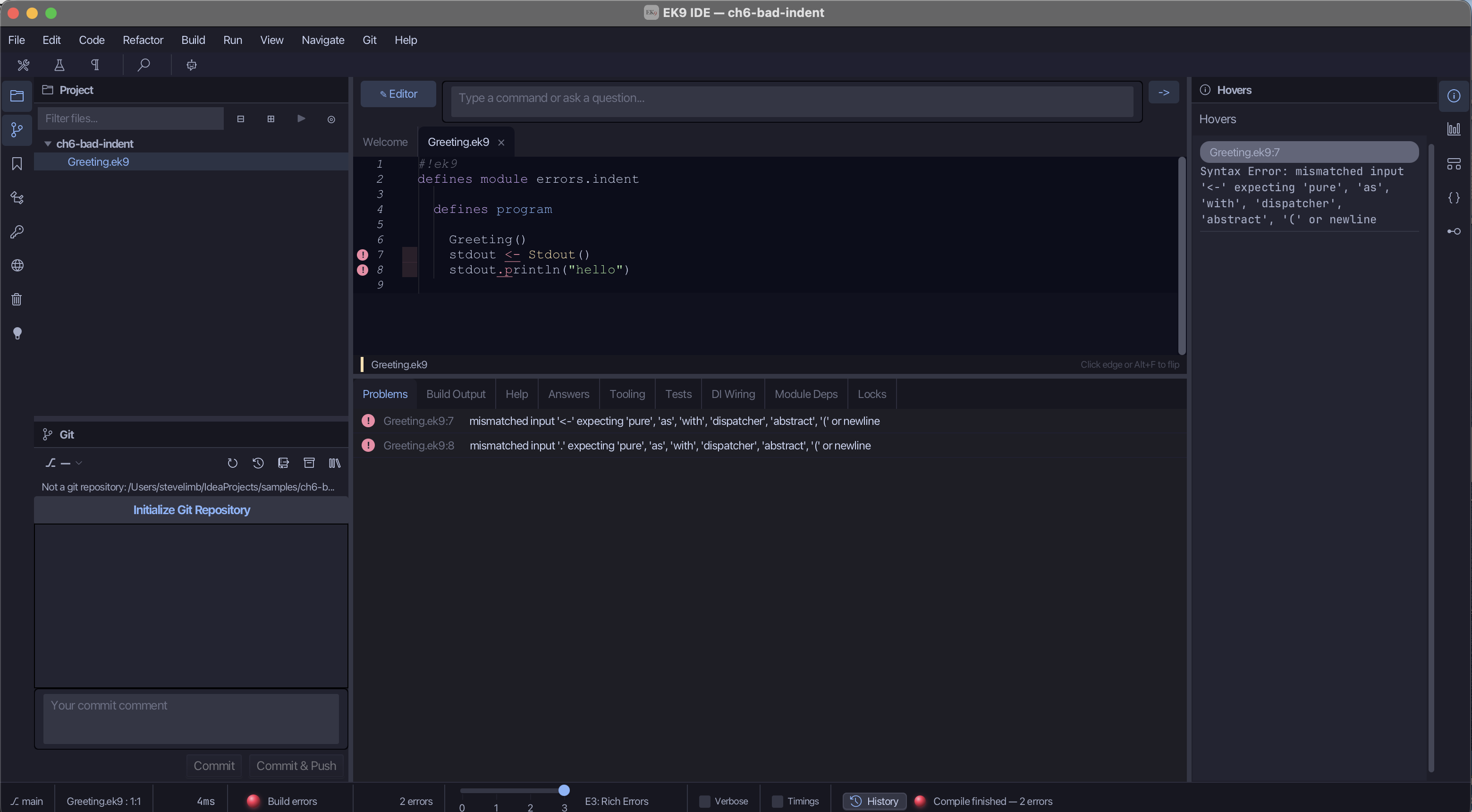
Syntax  : '<-' on line 7 position 11: mismatched input '<-' expecting 'pure', 'as', 'with', 'dispatcher', 'abstract', '(' or newline
Syntax  : '.' on line 8 position 10: mismatched input '.' expecting 'pure', 'as', 'with', 'dispatcher', 'abstract', '(' or newline
(After those two lines comes Unable to parse source file, with the full path of your file.) This
is a different kind of message: a syntax error, raised before the compiler gets as far as
meaning. Indentation is the structure in EK9. Here the two stdout lines are not indented under
Greeting(), so they do not belong to it, and the compiler cannot make sense of them. The fix is to
indent them so the shape on the page matches the shape you intend:
Greeting()
  stdout <- Stdout()
  stdout.println("hello")
"Mismatched input" is the compiler's way of saying "this is not where that belongs". When you see a syntax error, check your indentation first; it is the usual cause.
Note. The formatter (
ek9 -f, orek9 -ffto force it) tidies layout, but it does not guess structure. On this program it declines and says why: "Force format: the source still does not parse - line 7: mismatched input '<-' ...". It cannot know whether you meant those two lines to sit insideGreeting()or somewhere else, so it does not pick one silently. Fix the indentation yourself; the formatter will then keep it tidy.
Asking the compiler for the full explanation
Every message ends with See: ek9 -h E<code>. Run it for the always-true error:
ek9 -h E08086
and the compiler explains the rule in full: what it diagnoses, what to do, the common causes, and
worked examples. Its [ACTION] section reads:
[ACTION]
1. Remove the redundant condition and its else/default branch
2. If the condition is needed on some paths, restructure the logic
3. Check if a variable was intended to be reassigned before this check
4. Verify this isn't a copy-paste error from a similar condition
Around it are a [DIAGNOSIS] (what is wrong), [EXAMPLES] (questions you can open with ek9 -q),
[COMMON CAUSES], [SEE ALSO] (related error codes) and a compiled [EXAMPLE] of the error and
its fix.
The IDE shows the same explanation without leaving the editor: in the screenshots above, it is in
the Hovers pane when you rest the pointer on the marked code, and the Answers tab carries the
related question and answer. (The IDE companion book, ek9.io/ide/, covers the IDE in full.)
Three tools are worth knowing by name:
ek9 -h E<code>— the full explanation of any error code.ek9 -q <words>— search EK9's built-in questions and answers, each with a worked example, when you want the idea behind a rule rather than a fix.- Hover — in the IDE, rest the pointer on the marked code for the same message and help.
Guide, not gatekeeper
The compiler is not standing at a gate deciding whether to let your code through. It is standing next to you, pointing: this line, this reason, here is how to learn more. Each error points toward code that will still be correct next month. And when the compiler has nothing to say, that silence means something: each problem it checks for is absent, not merely unnoticed.
So when something will not build, read the message, find the spot, understand the reason, and ask for more if you need it.
Try it yourself
- Open
tautology.ek9from theerror-examplesfolder of the examples download. Read the error. Then fix it by makingtemperaturecome in as a program argument, and see the error clear. - In
magicLiteral.ek9, from the same folder, give50a name, and see the error go. - Break a program you wrote earlier on purpose: remove an indent, or compare against a bare
number. Read the message, then look up its code with
ek9 -h E<code>and read the full explanation.
Recap
An EK9 error message has five parts: code, location, snippet, reason, and the pointer to more.
You met four errors beginners hit, and saw that each message leads to the fix. For the full
explanation, use ek9 -h, a hover in the IDE, or ek9 -q. Treat each error as an
instruction.
You can now write small programs, hold and test values, make decisions and loops, build functions, check them with tests, and read the compiler's messages. The next chapters use those foundations to work with real data.
-
Naming a value is not only tidiness. Research on duplicated code (Juergens, Deissenboeck, Hummel and Wagner, "Do Code Clones Matter?", ICSE 2009) found that changes made to some copies but not to others are frequent, and that many of those unintended differences are bugs. A named value has one home, so it changes in one place. EK9 turns that guideline into a rule the compiler enforces. ↩
In the EK9 reference: Design note: errors, not warnings, Design note: why EK9 checks names, Compile-Time Code Quality Enforcement