Getting Started with EK9 · Chapter 5
Testing as You Go
You can now write functions. How do you know a function hands back the right answer? And a smaller puzzle sits underneath: so far the only thing you could run was a program. A function is not a program; it is called by other code. So how do you run a single function on its own, to see what it does?
The answer to both is a test: a small piece of code that runs one of your functions with an input you choose and checks the answer. It is the clean way to exercise a function by itself, and, kept as you go, it is how you stay sure your code is still right tomorrow.
Why test, and why early
It is tempting to treat testing as something done at the end, once the "real" work is finished. Left to the end, tests get rushed, skipped, or written to pass rather than to catch anything.
EK9 takes a firm line. You cannot publish a library in EK9 unless enough of its code is covered
by tests: the compiler measures it and refuses to package work that falls short.1 You
meet the same bar before publishing: every ek9 -t run requires 80% of your code to be
exercised, and reports a shortfall (with a non-zero exit code) even when every test passed. A test
is part of writing the code, in the same way that getting it to compile is. So test as you go:
write a little, check a little, and never build on a floor you have not stood on.
None of this is new. The value of testing early is old, settled advice. What EK9 changes is where testing lives: inside the language and the compiler, not in a separate tool you are trusted to reach for. That is the approach of the whole book in miniature: a well-proven practice, turned from a suggestion into a rule.
A function worth checking
Here is a small file with two functions to test. Put them in a file called maths.ek9.
#!ek9
defines module book.maths

  defines function

    square() as pure
      -> n as Integer
      <- result as Integer: n * n

    cube() as pure
      -> n as Integer
      <- result as Integer: n * n * n
These are two pure functions, each taking an Integer and returning one, as in the last
chapter. square(3) should give 9, and cube(2) should give 8. A test makes the computer
confirm it.
Where tests live
Test code goes in a directory named dev/, next to your program. Anything under dev/ is
development code — tests and scratch work — kept apart from the code you ship. Your tests can be
as thorough as you like without adding a line to the program you deliver.
Inside dev/, make a file tests.ek9:
#!ek9
defines module book.maths.tests

  references
    book.maths::cube
    book.maths::square

  defines program

    @Test
    SquareTest()
      assert square(3) == 9

    @Test
    CubeTest()
      assert cube(2) == 8
Three new things do the work here.
references brings in the functions to test. book.maths::square is the full name of
square: its module, then ::, then the function. Listing it under references lets this file
use square and cube by their short names.
@Test marks the program that follows as a test. The test runner looks for this mark to know
what to run. A test program's name, like SquareTest, says what it checks.
assert states something that must be true. assert square(3) == 9 says: "square(3) equals
9." If the claim holds, the test passes; if not, the test fails and tells you so. A test must
check something: a @Test with no assert (and no file of expected output, which the second
volume covers) will not compile (E81007), because a test that checks nothing would pass without
proving anything.
Note.
cubeis listed beforesquareunderreferences, even though the tests usesquarefirst. EK9 requires references in alphabetical order, and the compiler reports it if they are not, so a long list of references is always easy to scan.
Running the tests
Run your tests with the -t flag, t for test:
ek9 -t maths.ek9
The runner compiles everything, finds the tests, runs them, and reports:
ℹ️ Found 2 tests:
  2 assert (unit tests with assertions)

Executing 2 tests...

✅ PASS book.maths.tests::CubeTest [Assert] (3ms)
✅ PASS book.maths.tests::SquareTest [Assert] (3ms)

Summary: 2 passed, 0 failed (2 total)
Types: 2 assert
Duration: 7ms
Each test has a ✅ PASS line, and the summary reads 2 passed, 0 failed. Both claims held, and
the proof can be run again at any time.
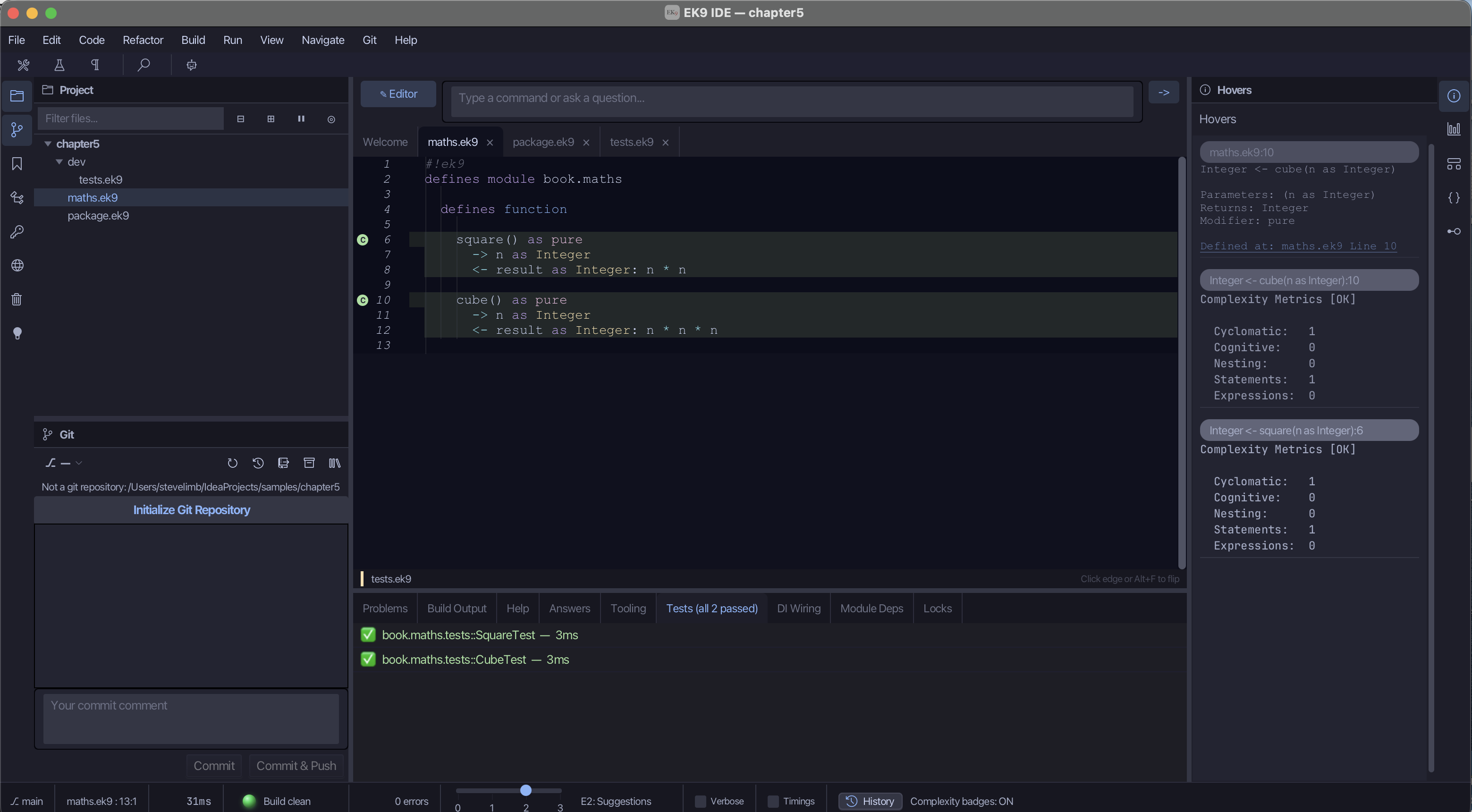
The IDE shows the same run. In the picture below, the Tests tab lists both tests with a green
tick, and the bodies of square and cube in the editor are shaded to show the lines your tests
ran. That shading is coverage: a picture of which code your tests have exercised. Here every
line is covered.
Note. On a colour terminal EK9 also colours this output:
PASSin green, test names in cyan, timings dimmed. The page shows the same text without colour. The timings in brackets will differ on your machine.
Covered is not the same as tested
Coverage here is 100%: every line of square and cube ran. That does not mean "fully tested".
Look at what was tried: square(3) and cube(2), two small positive numbers. Not zero, not a
negative, not a huge number or the largest an Integer can hold, not an unset value. Each of
those is a different kind of input, and the two tests touched one kind between them. A function
can run every one of its lines and still have been asked only the easiest question. 100% coverage
means every line ran, not that your code is right. Coverage counts how much of the code you
visited, not the variety of inputs you visited it with.
The tool that builds your code can also report that variety: how many kinds of input your tests drove, shown beside the coverage, together with a figure for how complex each function is.2 Only coverage is a hard rule; the variety figure is a report that shows where your tests are thin.
Tools in the IDE can help write the missing edge cases; the IDE companion book (ek9.io/ide/)
covers them, and the second volume goes into testing in depth. For now: a full coverage bar is
where good testing starts, not where it finishes.
When a test fails
A test earns its keep on the day it fails. Suppose you write n + n where you meant n * n
while editing square:
    square() as pure
      -> n as Integer
      <- result as Integer: n + n
It still compiles: n + n is valid code, just not a square. For n of 2 the two even agree
(2 + 2 and 2 * 2 are both 4), so a quick check might miss it. Run the tests:
ℹ️ Found 2 tests:
  2 assert (unit tests with assertions)

Executing 2 tests...

✅ PASS book.maths.tests::CubeTest [Assert] (3ms)
❌ FAIL book.maths.tests::SquareTest [Assert] (3ms)
    Assertion failed: `square(3) == 9` at ./dev/tests.ek9:12:7

Summary: 1 passed, 1 failed (2 total)
Types: 2 assert
Duration: 6ms
ek9: tests failed (exit 11)
The ❌ FAIL line names the claim that broke, square(3) == 9, and where it is: dev/tests.ek9,
line 12. square(3) came back as 6, not 9. There is no hunt; the test points at the problem.
It is the strict compiler's idea moved one step on: catch the mistake when it happens, and point
at it.
assert is for tests only
require, from the last chapter, states what must be true of a function's input and stops the
program if that is broken. assert looks similar but has a different job, and EK9 keeps them
apart. assert belongs to tests: it checks that your code produced the right answer. require
belongs to real code: it guards what a function needs. The compiler rejects assert in a
program you ship, so each word always means one thing.
Writing the test first
One way to use tests feels back to front at first: write the test before the function. State the
answer you want — assert square(3) == 9 — run it, and watch it fail, because square does not
exist yet or does nothing useful. Then write just enough to make it pass. The failing test is a
small, clear target, and you are done when it passes.
This book does not insist on working this way, but try it once on your next function. Deciding what "right" means before writing the code tends to make the code simpler, because you build it to a known answer.3
Try it yourself
- Add a
@Testforsquare(4). What answer should you assert? Run the tests. - Break
cubeon purpose (say,n * n). Run the tests and read which line the runner points to, then fix it and confirm the✅ PASSreturns. - Write the test first: add a
dev/test that assertssquare(10) == 100before the function is right, see it fail, then make it pass.
Recap
EK9 treats testing as part of writing code: you cannot publish without it, and every ek9 -t
run checks coverage. To run a single function by itself, write a @Test program in the
dev/ directory, using references to bring the function in and assert to state what
must be true. ek9 -t runs the tests and reports ✅ PASS, or a ❌ FAIL naming the broken
claim and its line. assert (for tests) and require (for real code) divide the work between them.
You now have the essentials: programs, values, decisions, loops, functions and tests. One skill remains before real data — reading the compiler when it stops you — and that is the next chapter.
-
"Coverage" is the share of your code that tests exercise. Requiring a minimum before publishing makes sure a library's promises have been checked, not just claimed. How it is measured is covered in the second volume. ↩
-
In most languages, coverage and quality are add-on tools you choose, install and configure yourself — for example JaCoCo (Java) or Istanbul (JavaScript) for coverage, and SonarQube, Checkstyle or PMD for quality and complexity — usually wired into a separate build step or a continuous-integration server. In EK9 the same measurements come from the compiler, with nothing extra to install or configure, when you run
ek9 -t. ↩ -
Writing the test first is the heart of test-driven development (TDD), set out by Kent Beck in Test-Driven Development: By Example (Addison-Wesley, 2002). The claim is not that tests find every bug, but that deciding the expected result up front leads to simpler, better-shaped code. The second volume returns to it. ↩
In the EK9 reference: Code Coverage in EK9, Test Generation in EK9, Testing in EK9