Getting Started with EK9 · Chapter 8
Speaking Every Language
In Text, Numbers, Time and Money, a Locale presented a value for a place: the right currency
symbol, the right date order. A program also says words — "Welcome", "Your basket is empty", "Are
you sure?" — and to reach people in another country those words have to change too. This chapter
shows how EK9 handles that, which is differently from most languages.
Why translation usually goes wrong
In most languages, translations live outside the program, in separate files, one per language, full of "key = text" lines. The code looks up a message by a string key while it runs.
That arrangement has two failure modes, and both appear in production. Mistype a key, and nothing complains until the program reaches that line and finds nothing. Add a new message in English but forget the French file, and the program runs until a French user reaches the gap and sees a blank, a raw key, or a crash. Nothing checked that every language was complete, because nothing could: the translations were text files the compiler never saw.
EK9 brings the words into the language, where the compiler can see them.
Text in the language itself
Here is a greeting in three languages. Look at the shape first; the explanation follows.
#!ek9
defines module book.greetings

  defines text for "en"
    Greeting
      welcome()
        -> name as String
        `Hello, ${name}! Welcome to EK9.`

  defines text for "fr"
    Greeting
      welcome()
        -> name as String
        `Bonjour, ${name} ! Bienvenue dans EK9.`

  defines text for "de"
    Greeting
      welcome()
        -> name as String
        `Hallo, ${name}! Willkommen bei EK9.`

  defines program
    Greet()
      stdout <- Stdout()
      me <- "Ada"

      english <- Greeting("en")
      stdout.println(english.welcome(me))

      french <- Greeting("fr")
      stdout.println(french.welcome(me))

      german <- Greeting("de")
      stdout.println(german.welcome(me))
Run it and each language speaks for itself:
Hello, Ada! Welcome to EK9.
Bonjour, Ada ! Bienvenue dans EK9.
Hallo, Ada! Willkommen bei EK9.
Read from the top. defines text for "en" opens a block of messages for one language, here
English. Inside it, Greeting is a named group of related messages. Inside that,
welcome() is a single message: it takes a name, and its body is a backtick string with
${name} placed in the sentence. The blocks for "fr" and "de" repeat the same structure,
translated.
The language code has a fixed shape: lower-case language, optionally followed by an underscore and
an upper-case region: "en", "fr", or "en_US". Write "en-US" (with a hyphen) or "EN"
(upper-case) in a text block and the compiler rejects it (E07900), naming the form it wants. A
Locale is more forgiving: Locale("en_US") and Locale("en-US") both work. This book uses the
underscore form everywhere, so one spelling serves both.
Note. Building your own types comes later, with records and classes. A
textblock is a special-purpose relative of that idea: a named set of messages, one version per language. ReadGreetingas a small group of functions that come in several languages; nothing else is needed to follow this chapter.
At the bottom, the program picks a language and uses it. Greeting("en") gives the English
messages, Greeting("fr") the French. From then on, welcome(me) returns the sentence for the
chosen language. The choice can come from anywhere — a setting, the user's country, a menu — so one
program greets everyone in their own words.
The translations are part of your program, in plain sight, and the compiler reads them like everything else.
Letting the user choose
That program hardwired each language. A real program lets the user decide. The choice usually
arrives as a command-line argument given when the program starts, or as an environment
variable the user has set. Either way it arrives as a String, and either way the user might ask
for a language you have not translated.
Here is the program taking the language as a command-line argument, as in Making Decisions and Repeating Work:
#!ek9
defines module book.greeting.choice

  defines text for "en"
    Greeting
      welcome()
        -> name as String
        `Hello, ${name}!`

  defines text for "fr"
    Greeting
      welcome()
        -> name as String
        `Bonjour, ${name} !`

  defines text for "de"
    Greeting
      welcome()
        -> name as String
        `Hallo, ${name}!`

  defines program
    Greet()
      -> requestedLang as String
      stdout <- Stdout()
      me <- "Ada"

      chosen <- Greeting(requestedLang)
      greeter <- chosen? <- chosen : Greeting("en")
      stdout.println(greeter.welcome(me))
Here are three separate runs — ek9 Greet.ek9 fr, then ek9 Greet.ek9 de, then
ek9 Greet.ek9 xx — with their output one after another:
Bonjour, Ada !
Hallo, Ada!
Hello, Ada!
Two lines carry the idea:
chosen <- Greeting(requestedLang)
greeter <- chosen? <- chosen : Greeting("en")
The first tries to load the requested language. If it is one you defined,
Greeting(requestedLang) gives back its messages. If it is not, as with "xx", it comes back
unset. Nothing crashes; "no such language" arrives as a value you can check.
That can only happen with a language worked out while the program runs. Write a language you have
not translated into the source itself, Greeting("xx"), and the program does not compile: the
compiler (E07157) names the languages Greeting does have.
The second line is a ternary, a one-line either/or. Read it as a question and two answers:
chosen? (is it set?), then after <- the value to use if so, chosen, and after : the value
otherwise, Greeting("en"). A supported language is used as it is, and anything else falls back to
English, so the user always gets a greeting.1
The environment-variable route has the same shape, with the language coming from the user's settings instead:
env <- EnvVars()
requestedLang <- env.get("APP_LANG")

chosen <- Greeting(requestedLang)
greeter <- chosen? <- chosen : Greeting("en")
EnvVars().get("APP_LANG") reads an environment variable. If the user has not set it, that comes
back unset too, and the same ternary falls back to English. One pattern covers both sources, because
an unknown language and a missing setting are both "unset".
Formatting values, the local way
A translated message usually carries a value as well: a price, a date, a quantity. Those need localising too. British English writes a price as "£1,234.56" and a date as "15 Jul 2026"; French writes "1 234,56 €" and "15 juil. 2026", with a space between thousands and a comma for the decimal point. A message that says "Bonjour" and then prints its numbers in the English style is only half-translated.
You can format values inside a text message, so the words and the values are localised together.
A text block already knows its language, so it provides the matching locale under the name
locale; you call locale.format(...) without constructing one. Here an order confirmation
carries a total and a delivery date:
#!ek9
defines module book.orders

  defines text for "en_GB"
    OrderText
      confirmation()
        ->
          total as Money
          arrival as Date
        `Your order comes to ${locale.format(total)}, arriving ${locale.mediumFormat(arrival)}.`

  defines text for "fr_FR"
    OrderText
      confirmation()
        ->
          total as Money
          arrival as Date
        `Votre commande s'élève à ${locale.format(total)}, livrée le ${locale.mediumFormat(arrival)}.`

  defines text for "de_DE"
    OrderText
      confirmation()
        ->
          total as Money
          arrival as Date
        `Ihre Bestellung beträgt ${locale.format(total)}, geliefert am ${locale.mediumFormat(arrival)}.`

  defines program
    Show()
      stdout <- Stdout()
      total <- 1234.56#EUR
      arrival <- 2026-07-15
      for lang in ["en_GB", "fr_FR", "de_DE"]
        order <- OrderText(lang)
        stdout.println(order.confirmation(total, arrival))
Your order comes to €1,234.56, arriving 15 Jul 2026.
Votre commande s'élève à 1 234,56 €, livrée le 15 juil. 2026.
Ihre Bestellung beträgt 1.234,56 €, geliefert am 15.07.2026.
Every language receives the same 1234.56#EUR and the same date, and presents them in its own
style. Because locale comes from the block's own for "..." language, the formatting cannot fall
out of step with the words: you cannot format French numbers with an English locale by mistake, as
you could if you named the locale by hand each time.
(The for lang in [...] loop goes through a list of language codes; lists are introduced properly
in Collections.)
Note. A text message's body is a single interpolated string. It may present and format, but never decide: no
if, noelse, no calculation. A message can lay a value out with${locale.format(...)}, but it cannot choose what to do. The limit is deliberate. It keeps the program's logic in the program and its wording in the text, so business rules cannot hide in a translation, and a translator editing the French never has to read, or risk breaking, a line of code.
Placement, and the trouble with placeholders
There are two common shortcuts for putting a value into a sentence, and both go wrong. The first is
to join strings together: "It's " + name + "'s birthday". The second, used by most localisation
systems, is a placeholder: a template kept in an external file, like "It's {0}'s birthday" or
"It's %s's birthday", with the value put into the numbered gap at run time. Both fail for the same
reason: where a value sits in a sentence, and what type it is, belong to the language, not the
program.
Take placement first. The position of a name differs between languages:
#!ek9
defines module book.birthday

  defines text for "en"
    Party
      announce()
        -> name as String
        `It's ${name}'s birthday today!`

  defines text for "fr"
    Party
      announce()
        -> name as String
        `C'est l'anniversaire de ${name} aujourd'hui !`

  defines text for "de"
    Party
      announce()
        -> name as String
        `Heute hat ${name} Geburtstag!`

  defines program
    Show()
      stdout <- Stdout()
      who <- "Sam"
      for lang in ["en", "fr", "de"]
        party <- Party(lang)
        stdout.println(party.announce(who))
It's Sam's birthday today!
C'est l'anniversaire de Sam aujourd'hui !
Heute hat Sam Geburtstag!
In English the name comes early, inside "Sam's"; in French it comes after "l'anniversaire de"; in
German it follows "hat". Join the pieces in a fixed order and the name is fixed to the place English
puts it. Because each text block writes the whole sentence, ${name} goes wherever that language
needs it, and, as the previous section showed, the format moves too.
A placeholder has a second failing: it is not type-safe. A template like "You owe {0} on {1}" is
only text. Nothing checks that exactly two values are passed, that the first is a Money and the second
a Date, or that a translator did not swap {0} and {1}. Those mistakes appear only when the program
runs, as a crash or, worse, a plausible but wrong line.2
A text message has no anonymous gaps. Its parameters are named and typed — total as Money,
arrival as Date — and ${total} refers to one of them by name. Pass the wrong type, too few
values, or a misspelled name, and it is a compile error. A check that elsewhere needs an extra tool
is here part of the language.
Note. Use a message in two steps: name the text object first, then call it —
party <- Party(lang), thenparty.announce(who), as above. It reads more clearly than doing both on one line, and it is the form used throughout this chapter.
The compiler keeps every language complete
Because the messages are in the language, the compiler can enforce a rule: every language must
define exactly the same messages. Suppose English gains a farewell() but German does not:
  defines text for "en"
    Greeting
      welcome()
        -> name as String
        `Hello, ${name}!`
      farewell()
        -> name as String
        `Goodbye, ${name}!`

  defines text for "de"
    Greeting
      welcome()
        -> name as String
        `Hallo, ${name}!`
This does not compile (the whole file is missingTranslation.ek9, in the error-examples folder of
the download):
EK9     : Error   : E07150: 'Greeting' on line 14 position 4: 'public String <- farewell(name as String) as abstract': text method missing for language variant
             See: ek9 -h E07150
The compiler compared the messages in each language, found German missing one, and stopped. A program with a missing translation cannot be built, so the failure from the start of this chapter — a missing message nobody noticed until a user in another country reached it — cannot reach users. The check moved to compile time, and that kind of bug cannot get through.
Adding a language with the IDE and an AI
If every language must be complete, then adding one message means writing it in all your languages, which you may not speak. Tools help here, and EK9's design helps them.
The EK9 IDE can add a new language for you (the IDE companion book, ek9.io/ide/, covers these
tools in full). To add Portuguese, choose Add Locale, name it pt, and pick an existing
language to clone from, such as English.
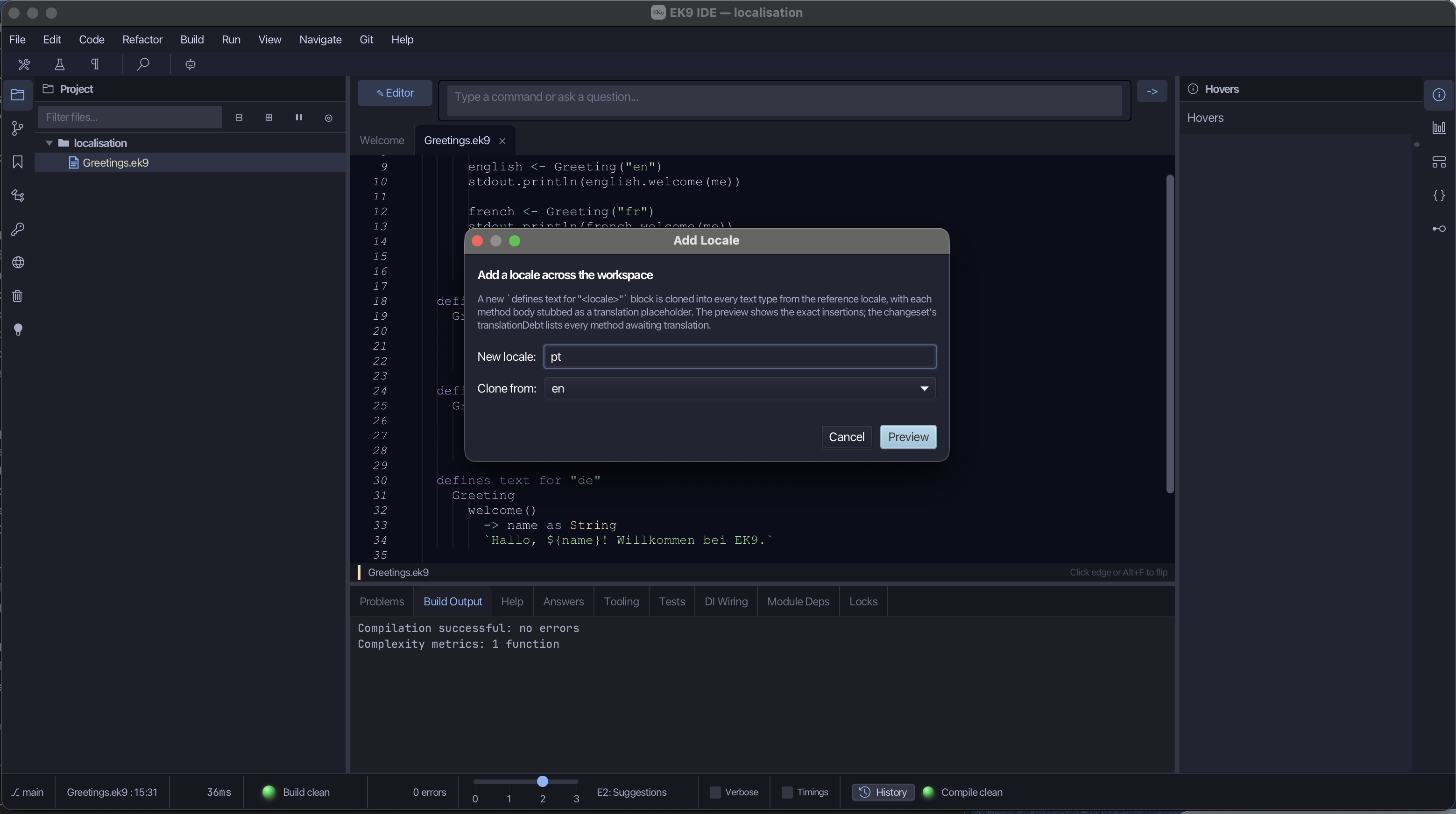
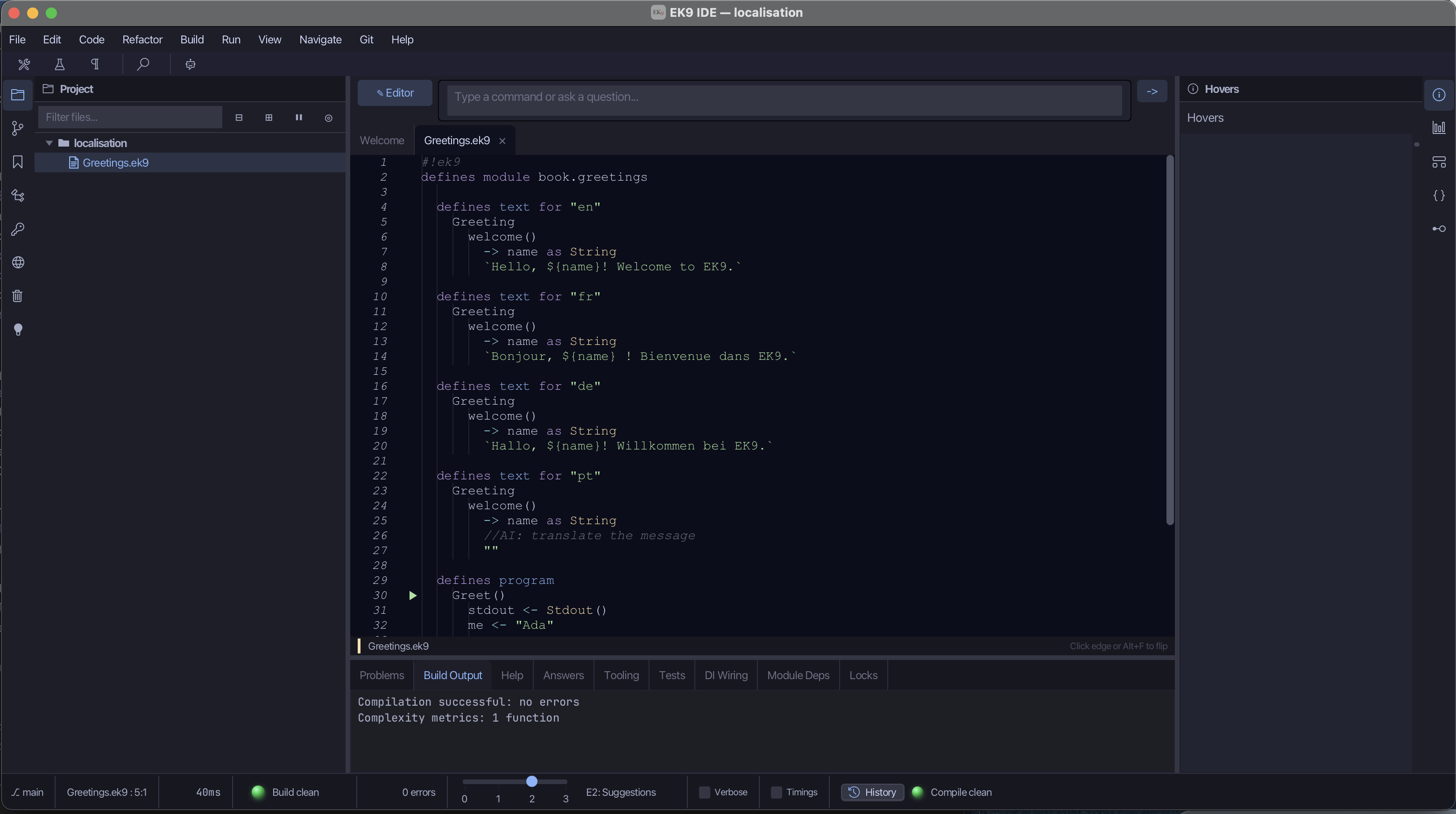
The tool copies every message into a new defines text for "pt" block, with each body replaced by an
empty message and a //AI: translate the message comment. This still compiles, because an empty
message is a valid message. The tool also records a translation debt: a list of every message
still waiting to be translated.
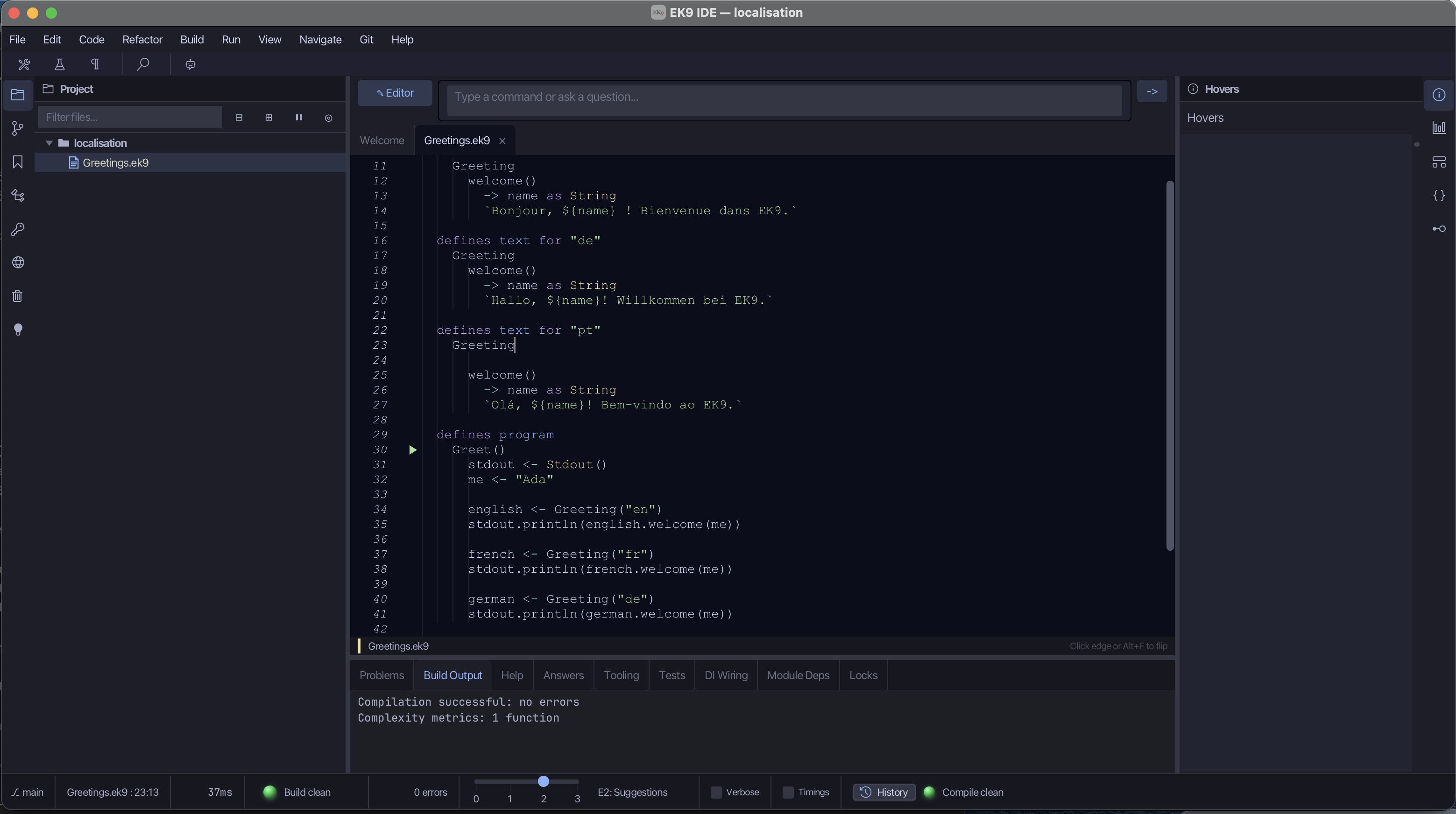
An AI assistant can work through that list, reading each hint and the original wording, and fill in
the translations — Hello, ${name}! Welcome to EK9. becomes Olá, ${name}! Bem-vindo ao EK9. — and
you review the results.
Be clear about what each part guarantees. The compiler guarantees that every language defines every
message (E07150 otherwise) and that each ${...} matches its typed parameter. It does not, and
cannot, check that a stub was ever translated: an empty message compiles. The IDE's translation debt
records which stubs are still waiting. You decide what to say; the IDE keeps the languages in step
and records what is owed; the AI drafts the translations; and the compiler guarantees the set is
complete and consistent.
Unicode throughout
The German ä and the French spacing above needed no special handling. EK9 text is Unicode
throughout, so accents, other alphabets and non-Latin scripts — Greek, Cyrillic, Arabic, Japanese —
are ordinary text.
Try it yourself
- Add a
farewell()message to each of the three languages and print it after the welcome. - Add a fourth language of your choice, with the
welcome()message, so the program still compiles. - Delete one translation and read the compiler's error: EK9 refusing to build a program with a missing translation.
Recap
EK9 treats translation as part of the language, not a set of external files. The text
construct — defines text for "en", a named group of messages, each a small method with an
interpolated body — keeps your wording in plain sight and lets a program pick a language at run time.
A text block provides a matching locale, so values inside a message are formatted for its
language. The compiler enforces that every language defines every message (E07150) and that
the interpolated values match their types, so a language that is missing a message cannot be
built. Whether each message has actually been translated is tracked by the IDE, not the compiler: an
empty stub compiles.
Next come EK9's collections: the tools for holding many values at once.
-
Guards and Safe Code returns to the ternary and adds its relatives that check for set values. The form is always
condition <- valueIfTrue : valueIfFalse. ↩ -
Format-string mistakes are a well-studied source of bugs; see Konstantin Weitz, Gene Kim, Siwakorn Srisakaokul and Michael D. Ernst, "A Type System for Format Strings" (ISSTA 2014). The common localisation tools all use positional, untyped placeholders in template strings — Java's
MessageFormat(from JDK 1.1, 1997) with{0}, thegettextlibrary and C printf-style APIs with%s, C#'sstring.Formatand.resxresources with{0}. Compile-time checking is available, but as an add-on — for example the Checker Framework's format-string checker forjavac— rather than as part of the language itself. ↩
In the EK9 reference: Text Properties in EK9