Getting Started with EK9 · Chapter 1
Hello, EK9
A programmer's first step is the same in every language: make the computer say something back. By the end of this chapter you will have written, built and run a complete EK9 program, you will understand every line of it, and you will have met the one idea that shapes the rest of the language.
The one big idea
The hard part of programming is not the mistakes the computer tells you about. It is the ones it does not.
A program runs and looks fine. An hour later it stops with a baffling message, or it quietly gives a wrong answer that nobody notices. Then the hunt begins: where did it go wrong, and why? That hunt, sometimes for hours over something tiny, is the real cost of writing code.
EK9 moves the hunt to before the program runs. A tool called the compiler turns your text into a program the computer can run, and EK9's compiler is strict on purpose. It refuses to build a program that contains one of a long list of known bug patterns, and it points at the spot while the problem is still small.
An EK9 error is the compiler doing part of the bug-hunting for you, early. And when a program builds with nothing to say, that means something: once it builds, a whole set of mistakes has already been ruled out.
Your first program
Here is a complete EK9 program. Type it into a file called HelloWorld.ek9, or find it in the
examples download. The .ek9 ending tells the compiler what kind of file it is.
#!ek9
defines module introduction

  defines program

    HelloWorld()
      stdout <- Stdout()
      stdout.println("Hello, World")
To run it, type the name of the tool, ek9, then the name of the file. (The Installing and
Running EK9 appendix lists the install steps.)
ek9 HelloWorld.ek9
It prints:
Hello, World
On macOS or Linux you can also mark the file executable and run it on its own,
./HelloWorld.ek9; that is what the #!ek9 first line is for. The chapter Programs, Input and
Output shows the one-time step. Either way the result is the same.
The picture below shows the same program in the EK9 IDE, with the message changed to
Hello, World!. The program is in the editor. Running it opens a window with a green
Success bar and the program's output. Under the editor, the Build Output tab reads
"Compilation successful: no errors": the compiler has checked the program and found nothing to
report.
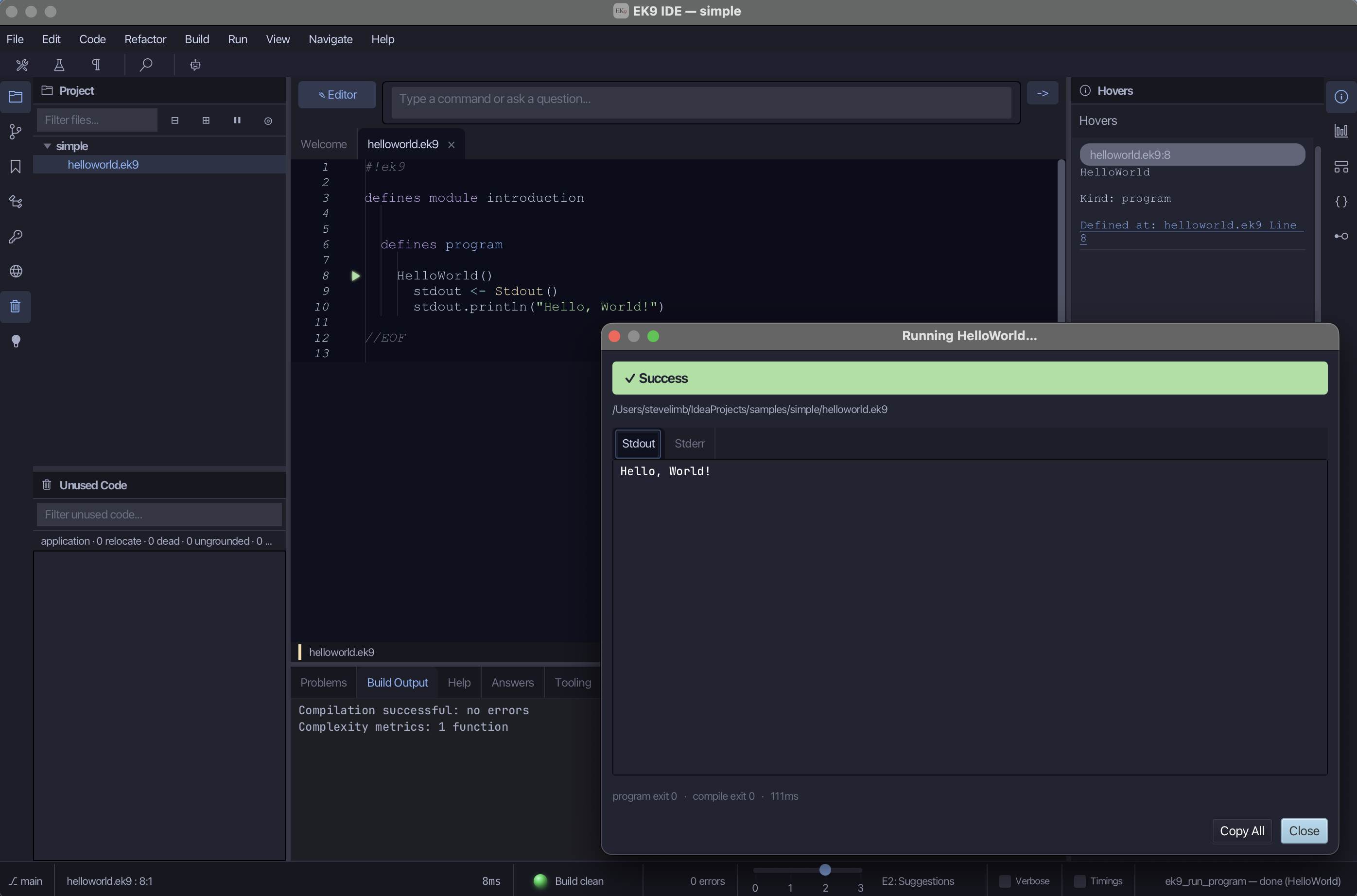
The program is six lines long. Here they are one at a time.
Reading the program, line by line
#!ek9 — The first line of every EK9 file is this short marker. It tells the system that
what follows is EK9 code. Every EK9 file in this book starts with it.
defines module introduction — Every EK9 file lives inside a module. A module is a named
box that keeps your work separate from everyone else's. This box is called introduction; the
name is the label on the outside, and everything else goes inside.
defines program — Inside the box we declare a program. A program is code you can run
directly: the place the computer begins. One module can hold several programs, and other kinds of
building block that later chapters introduce.
HelloWorld() — This names the program HelloWorld. The round brackets () mark it as
something you can call, which means run. Everything indented under this line is the body of
the program: the instructions themselves.
stdout <- Stdout() — This is the first instruction, and it does two things. Stdout is a
built-in tool for writing text to the screen; the name is short for "standard output". Writing
Stdout() makes one. The <- operator then declares a new name, stdout, and gives it that
new tool. From now on, stdout means "the screen-writer just made".
Note. You did not have to tell EK9 that
stdoutis a screen-writer. It worked that out from theStdout()on the right. This is called type inference, and the book uses it throughout.
stdout.println("Hello, World") — Now we use the screen-writer. The .println(...) part
means "print this line". The text in double quotes, "Hello, World", is the message. println
adds a new line at the end, so the next thing printed starts on the line below.
No braces, no semicolons
Many programming languages use punctuation to show structure: curly braces { } around a block,
and a semicolon ; at the end of each line. EK9 has neither.
Instead, EK9 uses indentation, the blank space at the start of a line. It shows which lines
belong together, like a nested list in ordinary writing.1 The two lines indented under
HelloWorld() belong to it. The HelloWorld() line, indented under defines program, belongs
to that. The shape you see on the page is the shape the compiler reads.
#!ek9
defines module introduction      // the box

  defines program                //   a kind of thing inside it

    HelloWorld()                 //   a specific program
      stdout <- Stdout()         //   its instructions, indented
      stdout.println("Hello, World")
The indentation is the syntax (the grammar the compiler reads), so keeping it even, the same number of spaces at each level, is part of writing correct EK9. Use spaces, never tabs: a tab is a build error. Two spaces per level is the standard step that the language and its formatter use.
EK9 comes with a formatter that lays your code out in one standard way. The IDE has it built
in, and at the command line ek9 -f MyFile.ek9 formats a file. If the indentation is in a real
muddle, ek9 -ff MyFile.ek9 tries to repair it. That leaves you to think about what the program
does, not how it looks.
Note. The text after
//is a comment. It is a note for human readers, and the compiler ignores it. Use comments to remind yourself, or the next person, what something is for.//runs to the end of the line. For a note that spans several lines, EK9 has a block comment that starts with<!-and ends with-!>.
Doing a little more
Now print two lines. The body of a program is a list of instructions, carried out in order, from top to bottom.
#!ek9
defines module introduction

  defines program

    Greeting()
      stdout <- Stdout()
      stdout.println("Hello, World")
      stdout.println("Welcome to EK9")
Run it and you get:
Hello, World
Welcome to EK9
The screen-writer is made once and used twice; stdout still refers to the same tool. Using a
name you have already declared is normal. What you may not do is declare the same name twice
with <-, because then it would be unclear which one you mean. The compiler stops you. This is
the kind of small, early check the whole language is built on.
Try it yourself
- Change the message so the program prints your own name.
- Add a third
printlnline. Predict what will appear before you run it. - Remove the indentation from the
stdout.println(...)line so it lines up withHelloWorld(). Try to build it, and read the error the compiler gives you. Reading errors is a skill, and it starts here; Reading the Compiler's Guidance explains this very message.
Recap
You have written and run a real EK9 program. You met the shape of every EK9 file: a module
that holds a program. EK9 uses indentation instead of braces and semicolons. The <-
operator declares a name and gives it a value, and type inference works out what kind of
value that is.
You also met the idea that runs through the whole book: the EK9 compiler is strict on purpose, and that strictness works for you.
The next chapter looks at the values those names can hold, and at one of EK9's less usual ideas: a value can be present and still not hold anything meaningful yet.
-
If you know Python, it uses indentation in the same way. ↩
In the EK9 reference: Command Line in EK9, Design note: start with code, then refactor, Introduction to EK9, Programs in EK9, EK9 REPL - Interactive Development, Structure of EK9