Getting Started with EK9 · Chapter 2
Values and the Three States
Programs spend most of their time moving values around: numbers, words, dates, prices. This chapter shows how to hold a value under a name, introduces the kinds of value EK9 starts you with, and explains an idea that prevents a well-known class of bugs: in EK9, a value can exist without yet holding anything meaningful.
Names for values
In Hello, EK9 you wrote stdout <- Stdout(). The same <- operator works for ordinary values:
name <- "Ada"
age <- 36
pi <- 3.142
Read <- as "is a new name for". After these three lines, name refers to the text "Ada",
age to the number 36, and pi to 3.142. A name paired with a value like this is called a
variable, because the value it refers to can change as the program runs.
You did not say what kind of value each name holds. EK9 reads "Ada" and works out that
name holds text; it reads 36 and works out a whole number, and 3.142 a number with a
decimal point. This is type inference again, doing everyday work.
Note. Values written straight into the code, like
"Ada",36and3.142, are called literals. A literal is a value spelled out in full, as opposed to one the program works out while it runs.
The built-in value types
A type is a kind of value. EK9 comes with a set of ready-made types; these five come first:
String— text, written between double quotes:"Ada","Hello, World".Integer— whole numbers:36,0,-5.Float— numbers with a decimal point:3.142,-0.5.Boolean— a yes/no value:trueorfalse.Character— a single letter or symbol, written between single quotes:'a','?','7'(double quotes always mean aString, even for one letter).
EK9 also has richer types that many languages leave you to build by hand: Date and
DateTime, Money, Duration, and Dimension for measurements. They come later.
Later still you will build your own types — a Person, a Score, a playing card — so a
program can talk about the things it is about, in its own words. That has a chapter of its own.
Each type knows how to behave. Numbers add and multiply; text joins together:
greeting <- "Hello, " + name
total <- age + 4
With name set to "Ada", greeting becomes "Hello, Ada", and total becomes 40. + is
an operator, a symbol that does a job, and it does the right job for the type it is given:
between two pieces of text it joins them, between two numbers it adds them. You can also define
what an operator like + means for your own types; the chapter Using Operators shows
how.
Putting values inside text
Joining text with + soon gets fiddly. EK9 has a neater way, called string interpolation,
which uses backtick quotes instead of double quotes:
name <- "Ada"
age <- 36
stdout <- Stdout()
stdout.println(`${name} is ${age} years old`)
This prints:
Ada is 36 years old
Inside backticks, anything between ${ and } is worked out and placed in the text. It reads
better than gluing pieces together with +, especially with several values.
To turn the number 36 into text, EK9 asks the value for its text form using an operator
written $ — read it as "give me this as a String". Every built-in type has one, and when you
build your own types you can give each its own $, so your values fit into text as neatly as a
number does.
Note. Inside these strings the backtick and the
$have a special meaning, so you write\`and\$when you want those characters as plain text, just as you write\"for a double quote inside a normal string.
New lines, tabs and other characters
Some characters are awkward to type into a string, such as a new line or a tab. For those you use
a backslash escape: a \ followed by a letter that stands for the character. The two most
common are \n for a new line and \t for a tab:
stdout.println("Roses are red,\nViolets are blue")
stdout.println(`Name:\tAda`)
Roses are red,
Violets are blue
Name:	Ada
The \n split the first line in two; the \t moved Ada to the next tab stop. There is also
\u, followed by four hexadecimal digits (base 16, counting 0-9 then A-F), which stands
for any character by its Unicode number:
stdout.println(`Caf\u00E9 costs \u00A31`)
Café costs £1
\u00E9 is é, and \u00A3 is £.
EK9 source is Unicode text, so if you can type the character you can also write it directly:
stdout.println(`Café costs £1`)
Café costs £1
The \u form is for characters you cannot easily type, or when you want to be exact about
which one you mean.
These escapes work the same way in both kinds of string, "..." and `...`, so "a\nb"
and `a\nb` each print across two lines. For a backslash itself, write \\.
Set and unset
This is the idea that sets EK9 apart, and later chapters lean on it.
Think of a value as a box, and its name as a label with an arrow running to the box. In EK9 a value is in one of three states. Two are everyday; the third is brief:
- Set — the box has something useful in it.
age <- 36puts36in the box. - Unset — the box exists, but nothing useful is in it yet. It is a real box, and it is empty.
- Absent — there is no box at all. The name has been written down, but it does not point at anything yet.
A passport makes the three concrete. Set is a filled-in passport: you can fly. Unset is a blank passport: a genuine document, but you still cannot fly with it. Absent is saying "I have a passport" with nothing in your hand.
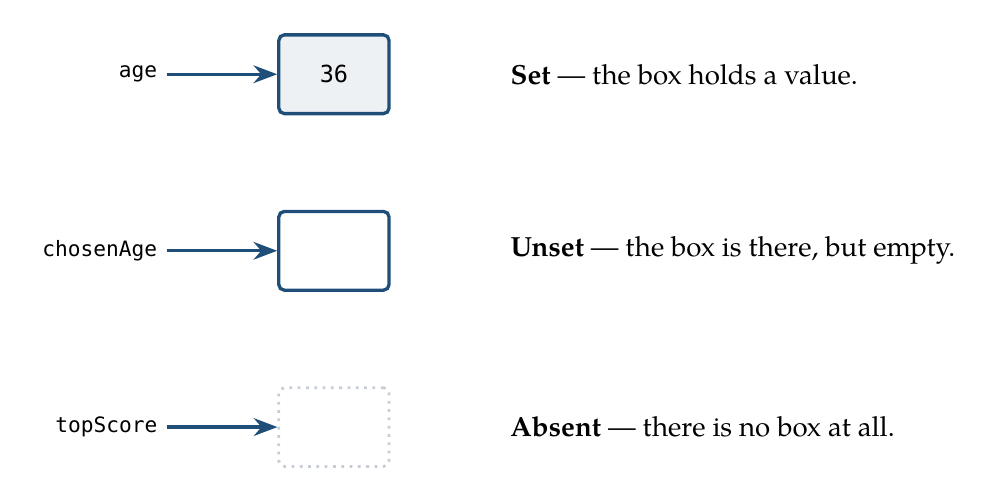
The third picture is where many languages come unstuck. In them, a name can point at no box at all; the Preface mentioned null pointers, and that missing box is exactly a null.
Here is what goes wrong. topScore is an ordinary name, but it points at nothing. The program
wants to print topScore, so it follows the arrow to fetch the value's text form — the $ from
earlier. There is no box. Nobody checked, so the program finds out only at that instant, and it
crashes: the null-pointer error (some languages call it a panic), a well-known cause of
software failures.
EK9 does not pretend the absent state cannot exist. You may still say a name has nothing yet. What EK9 is designed to take away is the crash: the compiler checks that a name has been given a real box before anything reads it, just as you must pick up a passport before you set off for the airport. When you have nothing useful to put in the box yet, make it unset: present but empty, an ordinary state to be in, not a trap. In place of a crash you get a state you can name and a check the compiler makes you keep.
Note. Some languages add this safety with a special wrapper type, often called
OptionalorMaybe: you put a value inside it, and the wrapper makes you ask "is anything in here?" before you use it. That only protects the values you remember to wrap. EK9 makes the question a property of every value: the?check (next section) works on anything. EK9 also has an explicitOptional, for when you want to say "there may or may not be a value here" out loud; it has a chapter of its own.
You make an unset value by naming a type with empty brackets:
selectedName <- String()      // a String box that exists but holds no text yet
chosenAge    <- Integer()     // an Integer box with no useful number yet
Compare that with the set versions:
selectedName <- "Ada"         // set: the box holds text
chosenAge    <- 36            // set: the box holds a number
Why would you want an empty box? Because programs often reach a point where "we do not know this yet" is the true answer: a form not filled in, a search not yet run, a choice not yet made. EK9 lets you say exactly that, instead of faking it with a zero or an empty string that someone might take for a real answer.
Asking whether a value is set
Because "unset" is a real state, EK9 gives you a way to ask about it: the ? operator. Put ?
after a value. It answers true if the value is set, and false if it is not.
selectedName <- String()
stdout <- Stdout()
stdout.println(`Is selectedName set? ${selectedName?}`)   // prints: Is selectedName set? false
The answer ? gives back is itself a value, of type Boolean. And a Boolean can also be
unset: "not yet known" is separate from both true and false. A question nobody has answered
yet is exactly that. Where a yes/no type can hold only two values, "not answered" has to be
faked.
Using an ordinary unset value is allowed. It stays unset and carries that forward: arithmetic on
an unset number gives an unset result. The example file Values.ek9 shows it:
chosenAge <- Integer()
later <- chosenAge + 4
stdout.println(`Is later set? ${later?}`)   // prints: Is later set? false
The ? check is the base of EK9's safety. The compiler tracks when a value could be unset or
absent. It will not let you read a value before it has been given one, and, as later chapters
show, it will not let you reach inside an Optional or Result you have not checked. That is
aimed at a well-known and costly bug: code that assumes a value is there when it is not.
Naming the type yourself
Every declaration so far has used <-, and EK9 has worked out the type from the value on the
right. That is the everyday way to declare a local variable, and the book uses it throughout.
Sometimes you want to name the type yourself. You do that with as:
chosenAge    as Integer: 36      // an Integer called chosenAge, set to 36
selectedName as String: "Ada"    // a String called selectedName, set to "Ada"
chosenAge as Integer: 36 says the same as chosenAge <- 36, with the type written out. The
value after the : is the starting value.
There are two reasons to write it this way. One is clarity: spelling out the type sometimes
makes code easier to read. The other is a convention of this book: when you build records
and classes, the fields inside them are written with the type spelled out, as in
balance as Integer: 0. (balance <- 0 would compile there too; the spelled-out form makes a
type's insides read clearly.) The rule of thumb: for an everyday local variable, prefer <-; for
the field of a type, use as Type:.
You can also declare a typed name with no starting value:
result as Integer? // an Integer, deliberately left absent for now
The ? on the end is required. It marks result as starting absent — no box at all yet —
and it says "there may be nothing here yet" in the code where everyone can see it. The compiler
then checks that result is given a real box, set or unset, before anything reads it.1
The chapter Classes has the rules that apply to the fields of your own types. Use this form only
when you cannot supply a starting value yet.2
Sometimes that is a necessity. The usual case is inside a type you build yourself: a field may
depend on what the code creating the object hands over, so it cannot be filled until that code
runs, usually inside a constructor (introduced with classes). Prefer to give a name its value
when you declare it; when the value does not exist yet, the ? form says so, and the compiler
checks the gap is filled before anything reads it.
Changing a value later
The <- operator declares a name for the first time. Once a name exists, you change what it
refers to with the := operator:
score <- 0          //declare 'score', starting at 0
score := 10         //change it to 10
score := score + 5  //change it to 15
Using <- twice for the same name is an error: you cannot declare a name twice. Using := on a
name that was never declared is also an error: you cannot change something that does not exist.
Each operator has one job, and the compiler holds you to it.
A name in EK9 refers to its value: picture the name pointing at the value, not holding a private copy of it. EK9 works this one way for every type, which keeps the rules simple.3
Note. There is a third assignment,
:=?, called assign-if-unset: "set this only if it is currently unset". It is introduced properly in Guards and Safe Code.
Try it yourself
- Declare a
Stringholding your home town and anIntegerholding the year you were born. Print a sentence about yourself using backtick interpolation. - Declare an unset
Integerand print its?check. Then give it a number with:=and print the?check again. It changes fromfalsetotrue. - Declare the same name twice with
<-, and read the compiler's error.
Recap
You can hold values under names, and you know EK9's starter types: String, Integer, Float,
Boolean and Character. String interpolation with backticks builds text from values. A
value is in one of three states — set, unset, or briefly absent — and the ?
operator asks whether it is set. EK9 has no null keyword by design: it aims to remove the
crashes that come from reading a value that is not there.
Next, these values are used to make decisions and to repeat work, and the set/unset idea keeps that safe too.
-
In Java,
Integer result;declares a name with nothing behind it, much like this. The difference is what happens next: Java lets a program follow that reference and crash, while EK9 checks thatresulthas been given a box before anything reads it. ↩ -
EK9 is deliberately relaxed about the exact symbol here, because programmers arrive from different languages with different habits. When giving a typed declaration its starting value,
:,=and:=are all accepted and mean the same thing —x as Integer: 0,x as Integer = 0andx as Integer := 0are identical — and the same three symbols also work for changing a value later. This book uses:for a starting value and for setting a function's return value, and:=for every later change to a variable or a field, so the two read differently at a glance; the EK9 documentation advises picking a style and keeping to it. ↩ -
Some languages copy simple values (numbers, characters) automatically but share larger objects, and you have to remember which is which. EK9 does not mix the two: a name always refers to its value. This matters once you work with things you can change in place: two names for the same thing then see the same changes. When you want a separate copy, EK9 has an explicit copy operator,
:=:. (For a built-in value such as anIntegerit copies the value; for a type you write yourself, the generated:=:is a shallow copy — the copy's fields refer to the same objects — unless you write your own.) The formal terms for the two behaviours are by value and by reference; EK9 is uniformly by reference, with copying made explicit. ↩
In the EK9 reference: EK9 Basics, EK9 Built in Types, Constants in EK9